 InstaCal
Get InstaCal
InstaCal
Get InstaCal
The calendar widget you never have to open.
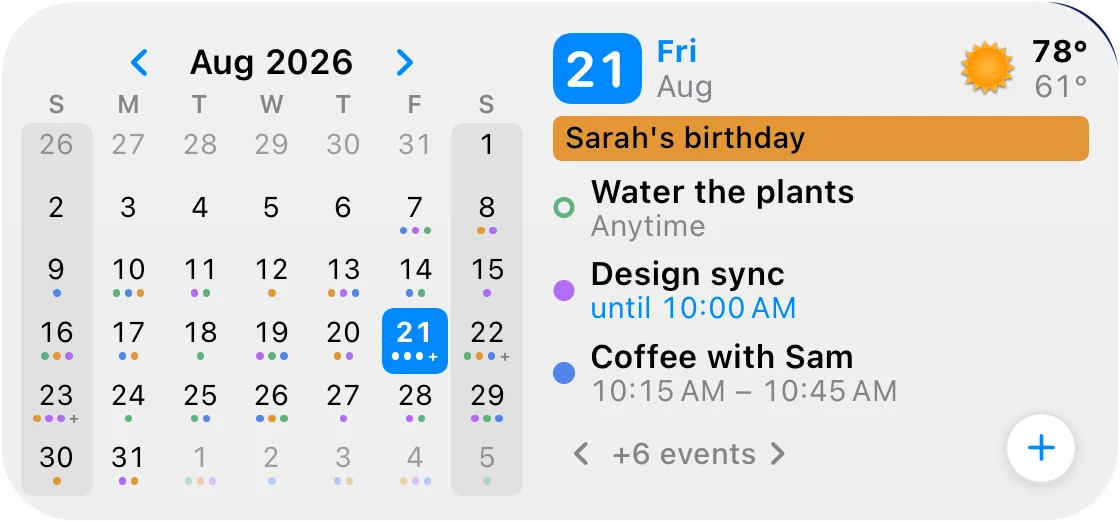
Up Next + Calendar puts a full month and your day side by side on the Home Screen — and every pixel of it is alive. Tap days. Flip months. Check things off. Add events. The app can stay closed.
$29.99 $19.99 once. Mac, iPhone, iPad and Apple Watch included. No subscription, ever.

Other widgets are pictures.
This one is an app.
The month grid is buttons. The arrows are buttons. The reminder rings are buttons. “Are we free on the 26th?” stops being open-app-switch-view-scroll and becomes a glance and a tap.
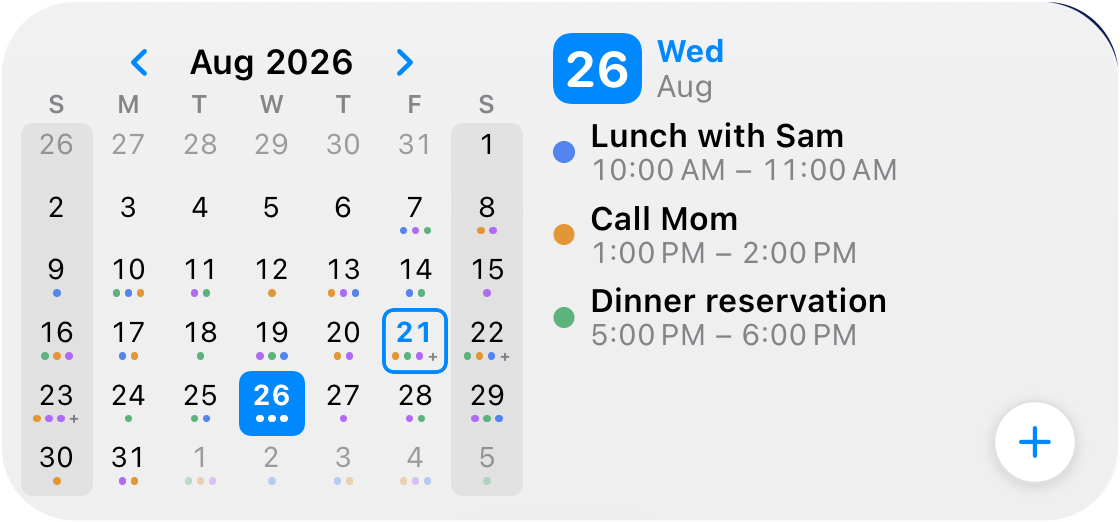
Tap any day. The widget answers.
Someone asks if the 26th works. Tap the 26th: lunch at 10, a call at 1, dinner at 5 — that day’s whole schedule, right there beside the grid. You just answered a scheduling question in two seconds without opening an app.
All 42 day cells are buttons. Today keeps a quiet ring so you never lose your place, and one tap on the month name snaps you home.
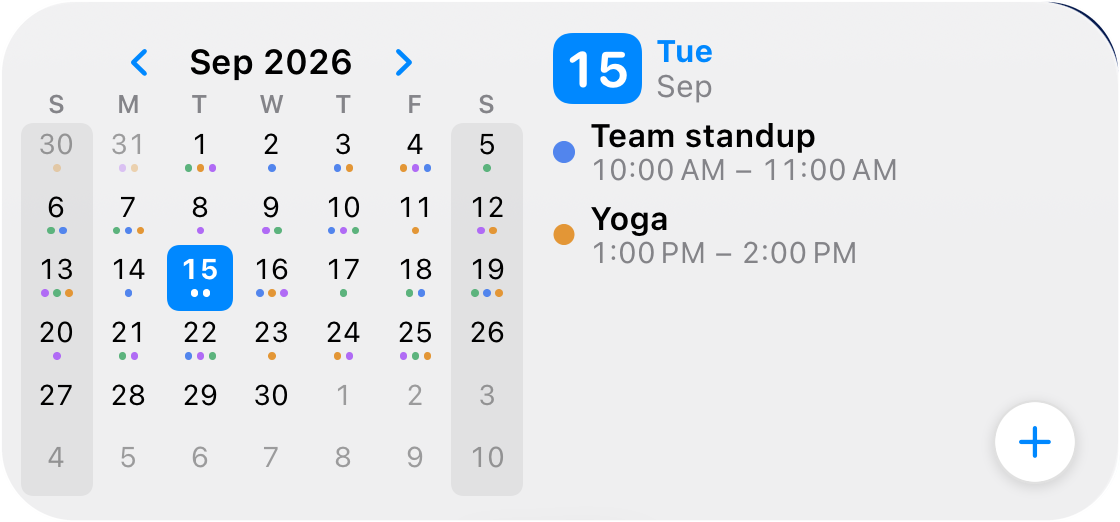
Flip months like pages.
Booking flights? Picking a wedding date? Dodging spring break? Page through 17 months of your real calendar — three back, a year ahead — every event dot intact. Long-range planning from your wallpaper.
The months are cached in the widget itself, so browsing is instant — even with the app closed.
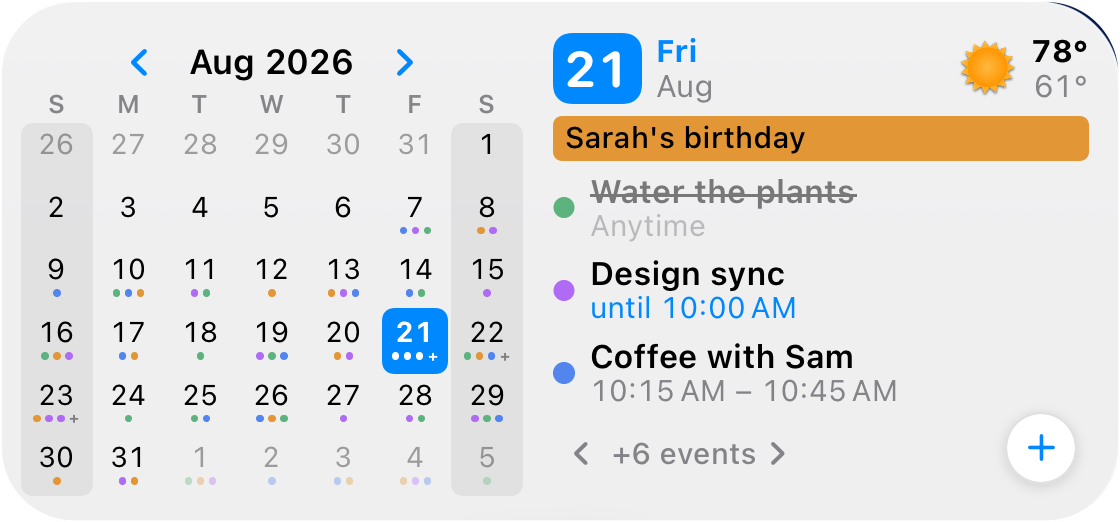
Check off reminders. Right there.
Prescription picked up. Plants watered. Tap the hollow ring and it’s done — struck through, faded, out of your head. Wrong ring? Tap again and it’s back. Finished tasks hand their row to what’s next, so the list you glance at is always the list that’s left.
Events get filled dots, tasks get rings, unanswered invites sit hollow — one glance tells you which is which.
And the + adds an event to the day you’re looking at.
The floating button opens plain-language Quick Add — “Lunch with Sam Friday 1pm” — and if you were browsing Thursday, it files the event on Thursday. The widget pays attention to context, because you were.
Obvious in a glance.
Absurd in the details.
Long-press → Edit Widget, and every placement becomes its own instrument. Two widgets from the same app can serve two different lives.
A heat map of your life
Swap the dots for a booked-time heat map and your month becomes a weather map of busyness — four honest shades from “free” to “spoken for.” Flip on Free/Busy only and a subscribed sports schedule stops making an empty week look full.

A widget that can keep a secret
Per-widget privacy: Full Details, Times Only, or Busy Only — where every title, time and calendar color collapses into one anonymous “Busy.” Your Home Screen stays useful; your 1:1s stay yours.

Busy days scroll in place
Tap “+6 events” and the list pages through the rest of your day — forward, back, and around again. A packed Thursday is never more than a couple of taps deep, and tapping the date snaps you back to the top.

Dark mode, or your mode
It follows the system, or you pin each widget Light or Dark — and it wears your accent color from the app, so the whole Home Screen reads as one product. Weather rides in the header with today’s high and low.

Five ways to mark a day
Dots, bars, a heat map, plain numbers — or a timeline that draws each day as one slim bar, each event’s segment sized by its real duration. Your month, at the altitude you think at.
Today and tomorrow
A “Tomorrow” section appears when today winds down — or always, or after an hour you choose. The large widget can even split into two full day columns, each with its own + button.
Calendar Sets, per widget
Pin one widget to Work and another to Family. Week numbers, weekend shading, current-week highlight, text size, which side the month sits on — all per placement.
Details you’d never notice.
Which is the point.
None of this announces itself. All of it is why the widget feels calm on a screen you look at two hundred times a day.
Unanswered invitations look unanswered. Hollow rings and washed-out banners for anything you haven’t replied to — provisional, not confirmed.
An in-progress meeting says “until 10:00 AM.” A start time that already passed is trivia; when you get out is the fact you need.
Your week starts where you say it does. First weekday, weekend days and week numbers all follow your region — including Friday–Saturday weekends.
Big text actually works. Turn up your iPhone’s text size and the widget shows fewer, larger rows — everything stays readable, nothing overlaps.
Every control speaks VoiceOver. Day cells announce their date and event count; arrows say which month they’ll show; reminder rings say what a tap will do.
Smart Stacks know when to surface it. The widget reports real relevance from your schedule, so it rises in the stack right before things happen.
Event rows deep-link to the exact event. When you do want the app, you land on the record itself — never on a home screen you have to navigate.
It doesn’t stop at the Home Screen.
iPad, extra large
The XL widget gives the month real estate a paper planner would envy, with a full-height agenda beside it. InstaCal on iPad →
Lock Screen & Live Activities
Next-event widgets above your wallpaper, and a live countdown that follows your current meeting. InstaCal on iPhone →
Mac & Apple Watch
Ten widget designs on the Mac desktop, and Now / Next / Later on your wrist. Mac widgets →
Everything else you’d want to know.
Does the widget need the app to be open?
No. Your schedule lives right in the widget and the app keeps it fresh in the background. Tapping a day, flipping a month or checking off a reminder all happen on the spot — the app can stay completely closed.
Doesn’t an interactive widget eat battery?
No. It redraws only when something changes — an event starting or ending, midnight rolling over, or you tapping it. Between those moments it costs nothing, exactly like Apple’s own widgets.
Google Calendar? Outlook? Work accounts?
Yes. Add Apple, Google or Microsoft 365 accounts in InstaCal and the widget shows them all in each calendar’s own color — and each widget can be pinned to a Calendar Set, like “Work only.”
What happens to my data?
Nothing interesting, which is the whole idea. InstaCal has no analytics, no tracking and no server of ours in the middle — events sync directly between your device and your calendar providers. The receipts are on the security & trust page.
Subscription?
Never. $19.99 once buys the Mac, iPhone, iPad and Apple Watch apps, this widget, and everything else — here’s the pricing story.
What do I need to run it?
iOS 18 or later. Medium and large sizes on iPhone, extra large on iPad. Add it like any widget: press and hold the Home Screen, tap Edit → Add Widget, search “InstaCal.” Up Next + Calendar is the first one in the gallery.
Put a calendar on your Home Screen
that actually answers back.
Up Next + Calendar comes with InstaCal — the fast calendar for Mac, iPhone, iPad and Apple Watch.
$29.99 $19.99, once. Every app, every widget, every future update in the price.