InstaCal at a glance
- What it is
- A Mac-first calendar built around the menu bar, with full native iPhone and iPad apps and a focused Apple Watch app included.
- Calendars
- Works across Apple, Google and Microsoft 365 — plus iCloud, Fastmail, Yahoo, Fruux and any other CalDAV server, signed in inside InstaCal rather than in System Settings.
- Connecting one
- iCloud, Fastmail, Yahoo and Fruux arrive with their server address already filled in and a link to the page where that provider issues an app-specific password; anything else standards-based goes in under CalDAV. A webcal, .ics or HTTPS feed subscribes with an optional password and a re-check interval you choose.
- Browsing
- Your calendars keep a local mirror of about six years of events and sync only what changed, so any month — 2024 or 2029 — paints the moment you arrive, online or off.
- Tasks
- Apple Reminders and Todoist sit in the same day: add, reschedule, complete and reopen either one, with priorities intact.
- Adding events
- Type in plain English with a live preview. On macOS 26 Apple Intelligence parses on-device; earlier versions use InstaCal's own parser.
- Meetings
- InstaCal detects meeting links in an event's URL field, location, or notes for Zoom, Google Meet, Microsoft Teams, Webex and more, then keeps a Join button available until the meeting ends. Connect Zoom and the editor can mint the meeting too, on any calendar — not only the ones whose provider offers Meet or Teams.
- Also included
- A Mac window with Day, Week, Month, Quarter, Year and List, six touch views on iPhone and iPad, a full Apple Watch app, ten widget designs, Countdowns, Live Activities, full editors, Calendar Sets, weather and themes.
- Guests
- Before a change touches an event's guests, InstaCal asks whether to email them — the same Send / Don't Send choice Google Calendar offers — for edits, reschedules, moves, deletes and new invitations.
- Price
- $19.99 once on the App Store, down from $29.99. One purchase includes InstaCal for Mac, iPhone, iPad and Apple Watch; it is not a subscription.
- Requirements
- macOS 15 or later, iOS or iPadOS 18 or later, and watchOS 11 or later.
- Privacy
- InstaCal contains no analytics and no tracking. Account tokens and app-specific passwords stay in Apple's Keychain, and events sync directly between your device and your calendar provider — there is no server of ours in between.
Every feature, grouped by what you came for.
Menu bar
What happens in the one strip of screen you glance at all day.
Countdowns to the dates that matter
A live countdown to a trip, a launch or a birthday — in the menu bar, in a widget, or both.
Mac menu bar calendar
Month view, long-range agenda, reminders and invitations in one panel that opens with a keystroke.
Plain-English event entry
Type "Lunch with Sam Friday 1pm" and press Return. A live preview shows what you'll get.
Desktop
The widgets that sit on your wallpaper and in Notification Center.
Planning
Deciding what happens when, and keeping the list where you can see it.
Platforms
The full calendar away from your Mac, and what follows you onto your wrist.
Accessibility
With VoiceOver, one swipe gives you the whole event — including what the screen says only in colour. No unlabelled buttons.
InstaCal for Apple Watch
A Now page that leads with what the moment calls for — time left, when to leave, a task coming due, tomorrow — plus your own pages and layouts, the to-scale Dayline, Quick Add understood on the wrist, and twelve complications including Now.
InstaCal for Mac
The menu bar panel, full six-view calendar, desktop widgets and private planning tools built specifically for macOS.
InstaCal for iPad
A responsive two- and three-pane calendar workspace with six views, a persistent agenda, event inspector and extra-large widgets.
InstaCal for iPhone
A complete touch-first calendar with six views, natural-language entry, reminders, widgets, Live Activities and one-tap meeting Join.
InstaCal for iPhone, iPad & Apple Watch
One universal Apple app with a complete touch calendar on iPhone and iPad, plus an action-first Apple Watch experience.
Calendars
The accounts it signs in to, and what it does with them.
Google Calendar in the menu bar
Sign in through your browser, keep tokens in your Keychain, and get Google events in the menu bar.
Keep a calendar private
Mark a calendar private and it stays hidden — everywhere — until you show it with Touch ID.
Outlook calendar in the menu bar
Microsoft 365 events in the macOS menu bar, with Teams links turned into one-click Join buttons.
Meetings
Getting into the call without hunting for the link.
Compare
Honest comparisons, and what the one-time price covers.
A BusyCal alternative
For the menu-bar-first way of working: the panel, plain-English entry and meeting join, one keystroke away.
A Fantastical alternative
The menu bar panel, plain-English entry and Calendar Sets — for one payment instead of a subscription.
A calendar without a subscription
One payment, every current feature, no InstaCal account and no tiers — across Mac, iPhone, iPad and Apple Watch.
An Itsycal alternative
Itsycal's speed and restraint, plus direct Google and Microsoft accounts, quick add and meeting join.
Help
When something isn't working.
There's a whole calendar app behind the panel.
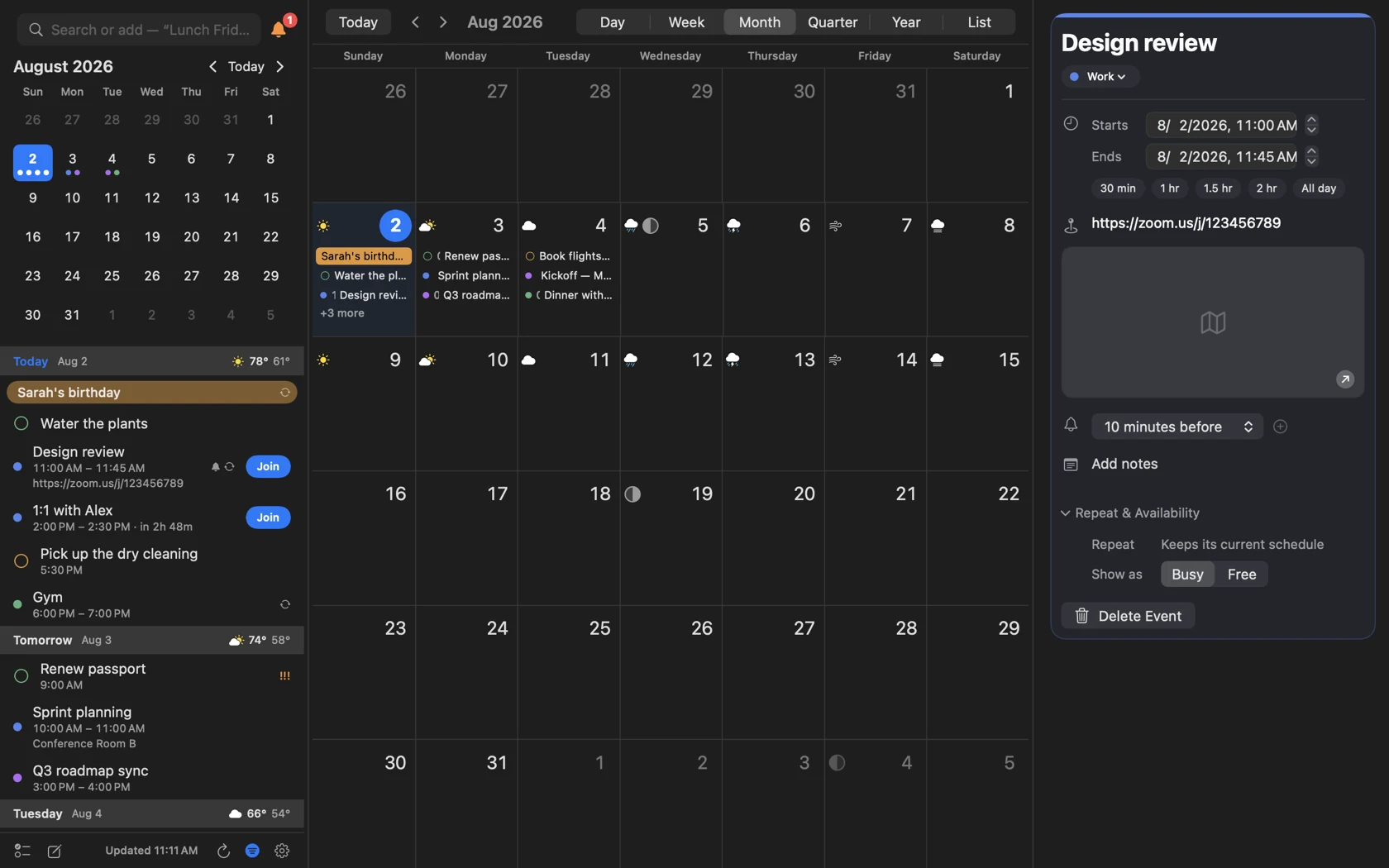
Day, Week, Month, Quarter, Year and List — when the panel is the wrong shape.
The panel answers "what's next". For everything else there's a real calendar window: the agenda still on the left, the month laid out properly, and any event's full detail in the inspector beside it. Every view scrolls without a page break — Month is one run of weeks, Quarter thirteen, Year a run of month rows four across.
- Six views, switched from the toolbar
- Week slides sideways through two to seven days at a time
- The sidebar is a mode: agenda, months, calendars, both or hidden
- The inspector edits in place — times, alerts, repeat, availability
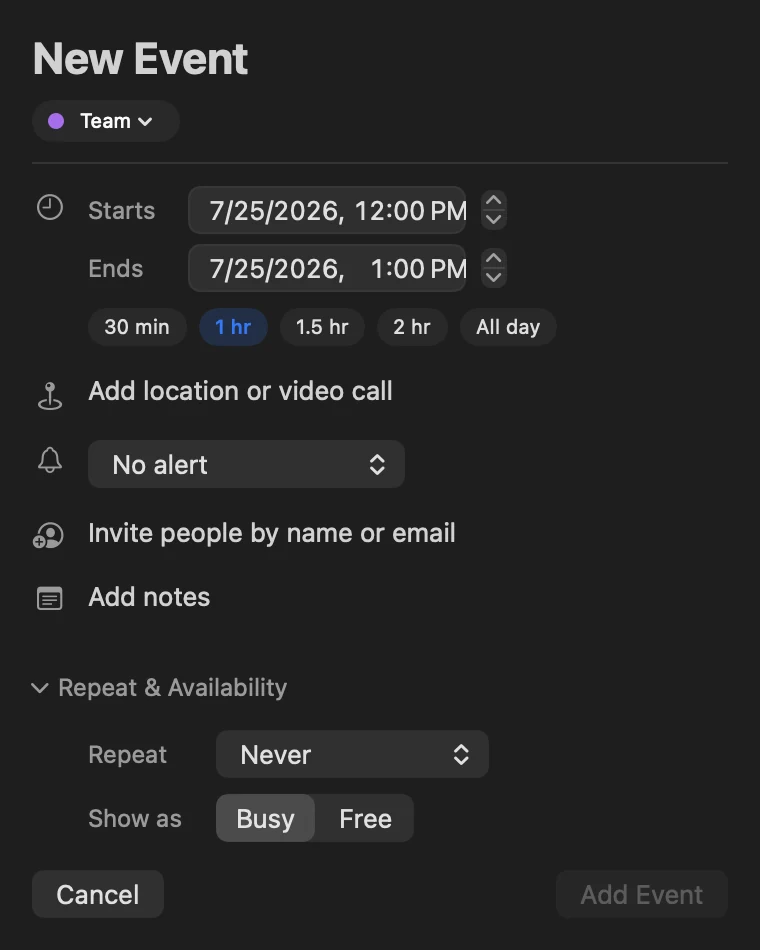
A real event editor, not a stripped-down one.
Duration chips for the common cases, location autocomplete through Maps, attendees with invitations on direct Google and Microsoft calendars, multiple alerts, repeat rules and availability — all without leaving the panel you opened it from.
- One-tap 30 min / 1 hr / 1.5 hr / 2 hr / All day
- Invite people by name or email, with Contacts autocomplete
- Multiple alerts per event
- Repeat rules and Busy/Free availability
Small app. Long feature list.
All of it included — there is no Pro tier.
A real event editor
Duration chips, repeat rules, availability, multiple alerts and Maps location autocomplete — plus attendee invites for direct Google and Microsoft calendars.
A real reminder editor
Due dates, priority, list and notes — including location-based geofence alerts. Todoist tasks sit in the same lists and the same days as Apple Reminders.
Accounts you add here, not in System Settings
iCloud, Fastmail, Yahoo and Fruux come with their server address filled in and a link to where the provider issues an app password. Any other CalDAV server, and any webcal or .ics feed, goes in the same sheet.
Zoom meetings you create
Connect Zoom once and the editor can put a Zoom meeting on any calendar, not only the ones whose provider offers Meet or Teams. It travels with the event and goes away when the event does.
Conflicts with a way out
An overlapping event gets a card naming what it collides with, the exact minutes in dispute, and a timeline of both. Click it for an open time to move to, a shorter version, or Busy turned off.
Ask for what's missing
Request a Feature lives in Settings — a type, a one-line summary, details and an optional screenshot, straight to the people who build InstaCal. No mail client, no account.
Notifications that act
Join calls, snooze or complete reminders, and get directions. Direct Google and Microsoft accounts can answer invitations from the banner too.
A full calendar window
Day, Week, Month, Quarter, Year and List views with search and week numbers, when the panel isn't the right shape for the question.
Weather in the day header
Conditions, high and low from Apple Weather or The Weather Company — or off, if you'd rather.
Made yours
Accent colour, panel background and height, day-header colours, three agenda layouts, per-calendar colour overrides, week numbers and a second time zone.
Built for the keyboard
Global hotkeys open the panel, start an event or jump to reminders from any app — and focus returns exactly where it was.
Important-date Countdowns
Link an existing calendar event or add a standalone birthday, anniversary or milestone, then keep it visible in widgets from the Lock Screen to the Mac desktop.
A Watch app that acts
Right Now, Today, Tasks and Week Pulse — plus Join, Directions, RSVP, reminder actions, rescheduling, focused editing and seven configurable complications.
Native and quiet
Pure Swift, no web wrapper, launch at login registered the modern way, and no background bloat.
Questions about InstaCal
What does InstaCal do?
Which calendar accounts does it work with?
Is InstaCal only for the menu bar?
What does InstaCal require?
Does InstaCal collect any data?
How much does InstaCal cost?

The whole app, for one payment.
$19.99 once. Mac, iPhone, iPad and Apple Watch included. No subscription.
$29.99 $19.99 once. One purchase includes InstaCal for Mac, iPhone, iPad and Apple Watch. No subscription, InstaCal account or ads.