InstaCal widgets, in short
- What you get
- Ten widget designs — Next Event, Now + Next, Days Ahead, Week Map, Reminders, Today, Month, Up Next + Calendar, Countdowns and Action Center — installed with InstaCal.
- Where they live
- The Mac desktop and Notification Center, iPhone and iPad Home Screens, and compact accessory layouts on the iPhone Lock Screen.
- Multi-day events
- Drawn as one continuous bar across the days it covers, using the same layout engine as InstaCal's own Month view. Other calendar widgets draw a dot per day.
- Reminders
- Tick one off in the Today widget without opening anything. Tick it again to bring it back — it is a toggle, not a one-way trip.
- Appearance
- Each full widget can take a Theme of its own: System, Light or Dark. A widget sits on a wallpaper, so it should not be forced to follow the app window.
- Also on iPhone
- Lock Screen widgets, a next-event or leave-by Live Activity, Dynamic Island updates and a Quick Add control.
A widget for the question you are actually asking.
Swipe through real widgets from the latest build. Choose a design, size and appearance independently on each screen.


What each one is for.
These are the names that appear in the widget gallery. Sizes vary by device; Extra Large is available where the platform offers it.
| Sizes on Mac | What it shows | |
|---|---|---|
| Next Event | Small, Medium, Lock Screen | Your next event and a countdown that stays live, so it never needs a redraw to stay honest. |
| Now + Next | Small, Lock Screen | The current event and the next one together, so an in-progress meeting does not disappear. |
| Days Ahead | Medium, Large, Extra Large | A compact multi-day agenda for scanning the near future. |
| Week Map | Medium, Large, Extra Large | A visual map of commitments and open time across the week. |
| Reminders | Small, Medium, Lock Screen | Focused tasks that can be completed without opening InstaCal. |
| Today | Small, Medium, Large, Extra Large | What is left of your day. Tap a row to open it, or complete a reminder right there in the widget. |
| Month | Small, Medium, Large, Extra Large, Lock Screen | The month at a glance, with multi-day events drawn as continuous bars rather than dots. |
| Up Next + Calendar | Medium, Large, Extra Large | Your next events and tasks beside a tappable month, with Calendar Set, privacy and weather controls per placement. |
| Countdowns | Small, Medium, Large, Extra Large, Lock Screen | One featured calendar event or standalone date, with more upcoming moments as the widget grows. |
| Action Center | Medium | A focused shortcut into plain-language Quick Add for a new event or reminder. |
Lock Screen accessories, the Live Activity and Quick Add control are iPhone features. Full-size widgets are available on Mac, iPhone and iPad according to the sizes each platform supports.
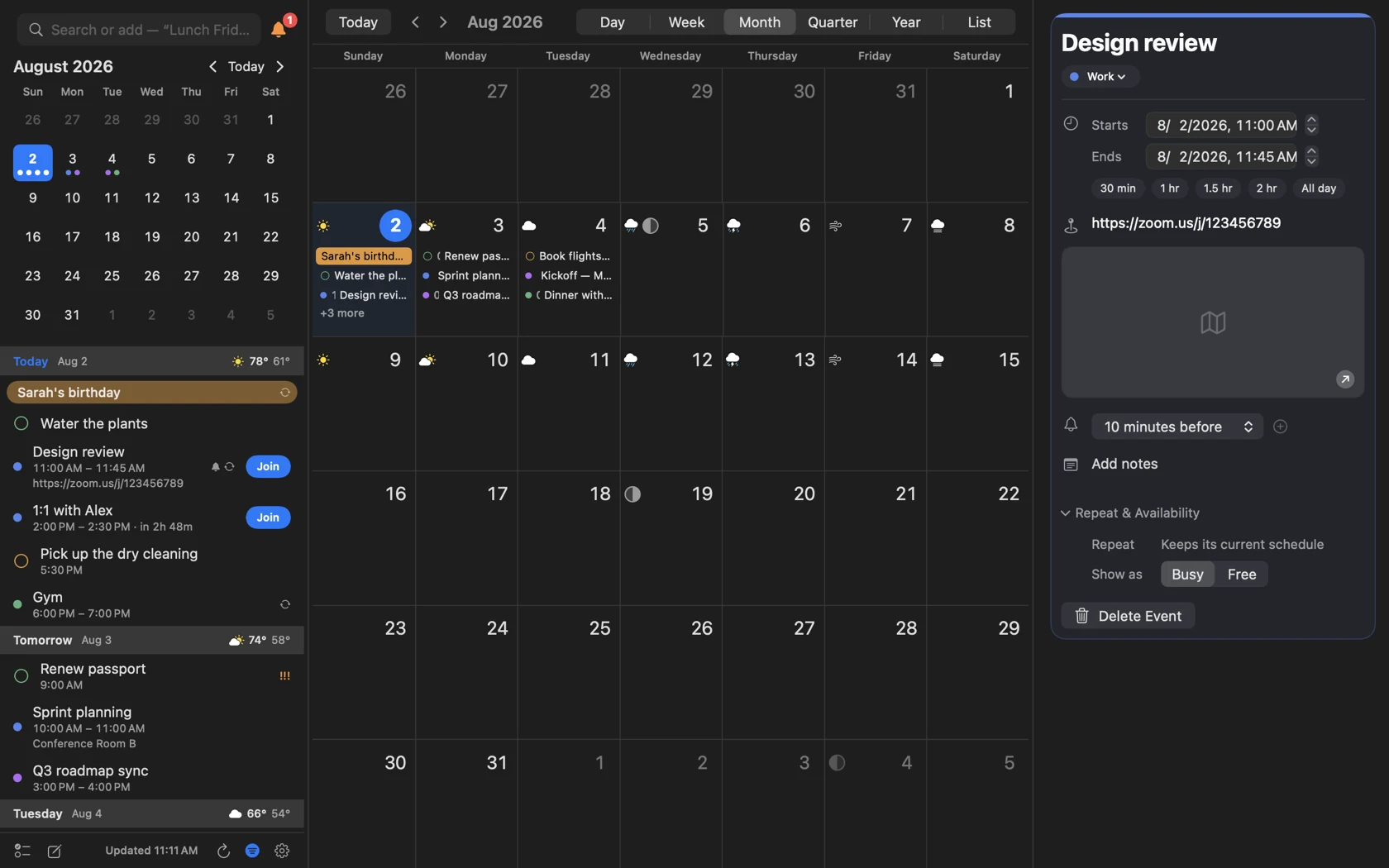
A trip is one thing, so it should be one bar.
Every other calendar widget marks a multi-day event with a dot on each day it touches, which asks you to notice that Tuesday, Wednesday and Thursday are the same conference. InstaCal runs the app's own spanning-bar layout inside the widget, so it draws what is actually true: one bar, across three days. Pictured is InstaCal's full Month view — the Month widget draws its grid with the same engine.
- The same layout engine as InstaCal's full Month view
- Continuous bars for anything longer than a day
- Week numbers, weekend shading and current-week highlight, all optional
- Five month styles: dots, bars, heat map, plain or timeline
The details a calendar widget usually gets wrong.
None of these are headline features. They are the reasons a widget either earns its place on your desktop or gets removed after a week.
It admits when it is out of date
If the underlying data has expired, the widget says Out of date rather than confidently showing you yesterday. A calendar widget that lies quietly is worse than one that asks to be opened.
Every tap lands somewhere specific
Tapping a day opens that day, and tapping an event opens that event — not wherever InstaCal happened to be when you last closed it.
Ticking a reminder is a toggle
Complete one from the Today widget, change your mind, tap again and it comes back. Most widgets make completion a one-way action you can only undo inside the app.
It costs nothing to refresh
The widgets read a small shared snapshot rather than querying your calendar database directly, so refreshing them does not wake the calendar store or spend a permission check.
Up Next + Calendar, configured
- What is listed
- Events, tasks and all-day banners, each independently switchable, so the widget can be a pure task list or a pure agenda.
- The month beside it
- Dots, spanning bars, a heat map, plain numbers or a timeline — and the heat map can count only the days you are actually busy.
- Which side
- The calendar sits on the left or the right of the list, whichever suits where the widget lands on your desktop.
- Rolling over to tomorrow
- Never, as soon as today is finished, or after an hour you pick. “Nothing left today” is true and useless all evening, which is exactly when people check what the morning holds.
- Text size
- Small, medium or large, independent of the system setting.
- Calendar decoration
- Week numbers, weekend highlighting and current-week highlighting, each on or off.
- Privacy
- Full Details, Times Only or Busy Only for each placement, so a shared-screen widget can reveal less than one on a private desktop.
- Weather
- Shown or hidden per widget instead of changing every Up Next + Calendar placement at once.
Why the theme is per widget, not per Mac
macOS gives you one appearance for everything, which is the right answer for apps and the wrong one for widgets. A widget does not sit in a window; it sits on your wallpaper. A light widget on a dark wallpaper is the unreadable one at noon, and switching your whole Mac to dark mode to fix a single widget is not a trade anybody should have to make.
So each InstaCal widget carries its own Theme setting — System, Light or Dark. Leave it on System and it follows the Mac, as you would expect. Set it explicitly and that widget stops caring what the rest of the machine is doing.
Questions about InstaCal widgets
Which calendar widgets does InstaCal include?
Can I complete a reminder from the widget?
Do multi-day events show properly?
Can a widget be dark while the rest of my Mac is light?
What does iPhone add?
What do the widgets require?
How much does InstaCal cost?
Does InstaCal collect any data?

Put the right part of your calendar on every screen.
Ten widget designs, Lock Screen widgets and Live Activities. Included for $19.99 once.
$29.99 $19.99 once. One purchase includes InstaCal for Mac, iPhone, iPad and Apple Watch. No subscription, InstaCal account or ads.
More from InstaCal
Mac menu bar calendar
Month view, long-range agenda, reminders and invitations in one panel that opens with a keystroke.
InstaCal for iPhone
A complete touch-first calendar with six views, natural-language entry, reminders, widgets, Live Activities and one-tap meeting Join.
Next meeting in the menu bar
Your next event and a live countdown where you already look, with a one-click Join.