Direct accounts, and a conflict that says what it costs
iCloud, Fastmail and any CalDAV server connect inside the app, Zoom meetings come from the event editor, an overlapping event gets a card that prices the clash, and every view scrolls without end — on the Mac, iPhone and iPad.
A conflict that says what it costsMac
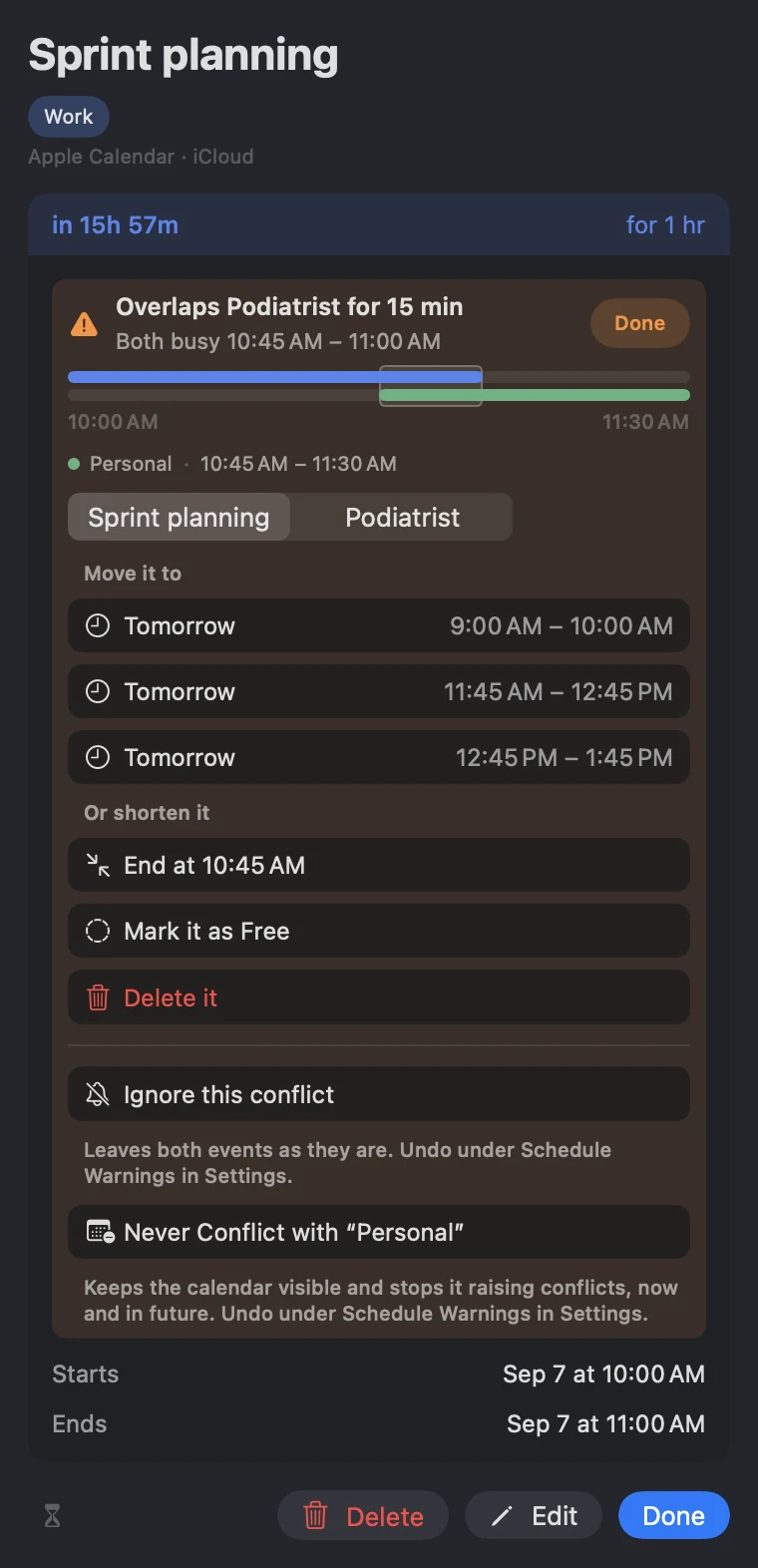
An overlapping event now gets a card of its own, and that card does the arithmetic for you. It names the other event and how much of your time it takes — "Overlaps Podiatrist for 15 min", or its own sentence when one event swallows the other whole — and under that, the exact stretch in dispute: "Both busy 10:45 AM – 11:00 AM". A timeline draws both events as bars on one shared axis, with your event's bar in the same place on every conflict row, so two or three collisions can be read against each other.
Clicking anywhere on the card opens the ways out: open times to move to, found against the same calendars that called this busy; ending the event where the other one starts; marking it Free; or leaving both alone. A calendar you can see but cannot act on — a shared family calendar, a holiday feed — can be kept out of conflict checking entirely, from the conflict itself.
Every way a calendar can connect, in one listMac
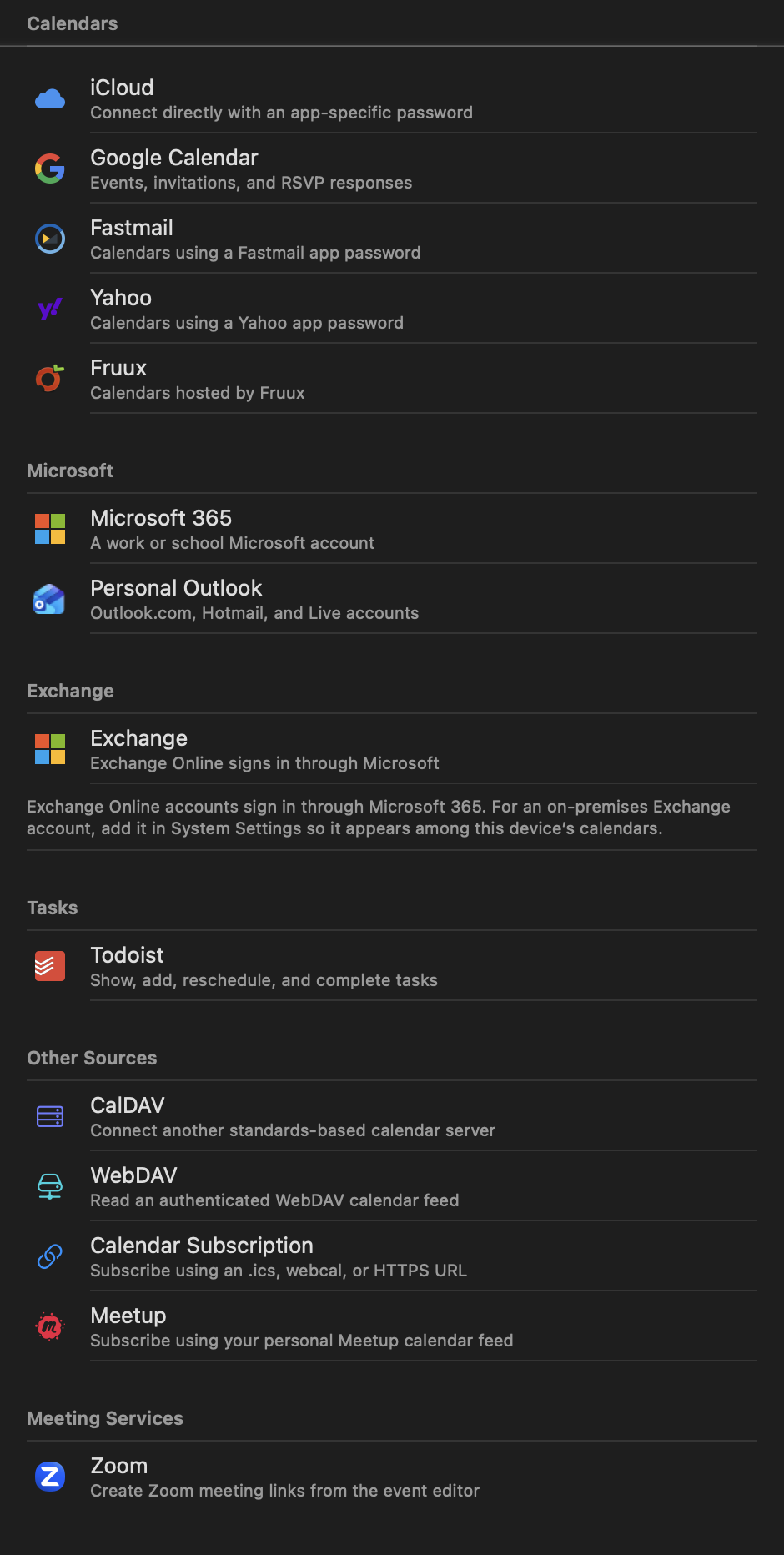
Settings ▸ Accounts ▸ Add Direct Account… lists every kind of calendar InstaCal can connect to on its own, without going through System Settings first. iCloud, Fastmail, Yahoo and Fruux arrive with their server address already filled in and a link to the page where that provider issues an app-specific password. Google, Microsoft 365, Personal Outlook and Exchange Online sign in with their own consent screens.
Any other standards-based server goes in under CalDAV, WebDAV and Calendar Subscription read a feed, Meetup subscribes to your own calendar there, Todoist brings its tasks alongside your reminders, and Zoom lets the event editor mint a meeting on any calendar.
A sidebar that holds what you wantMac
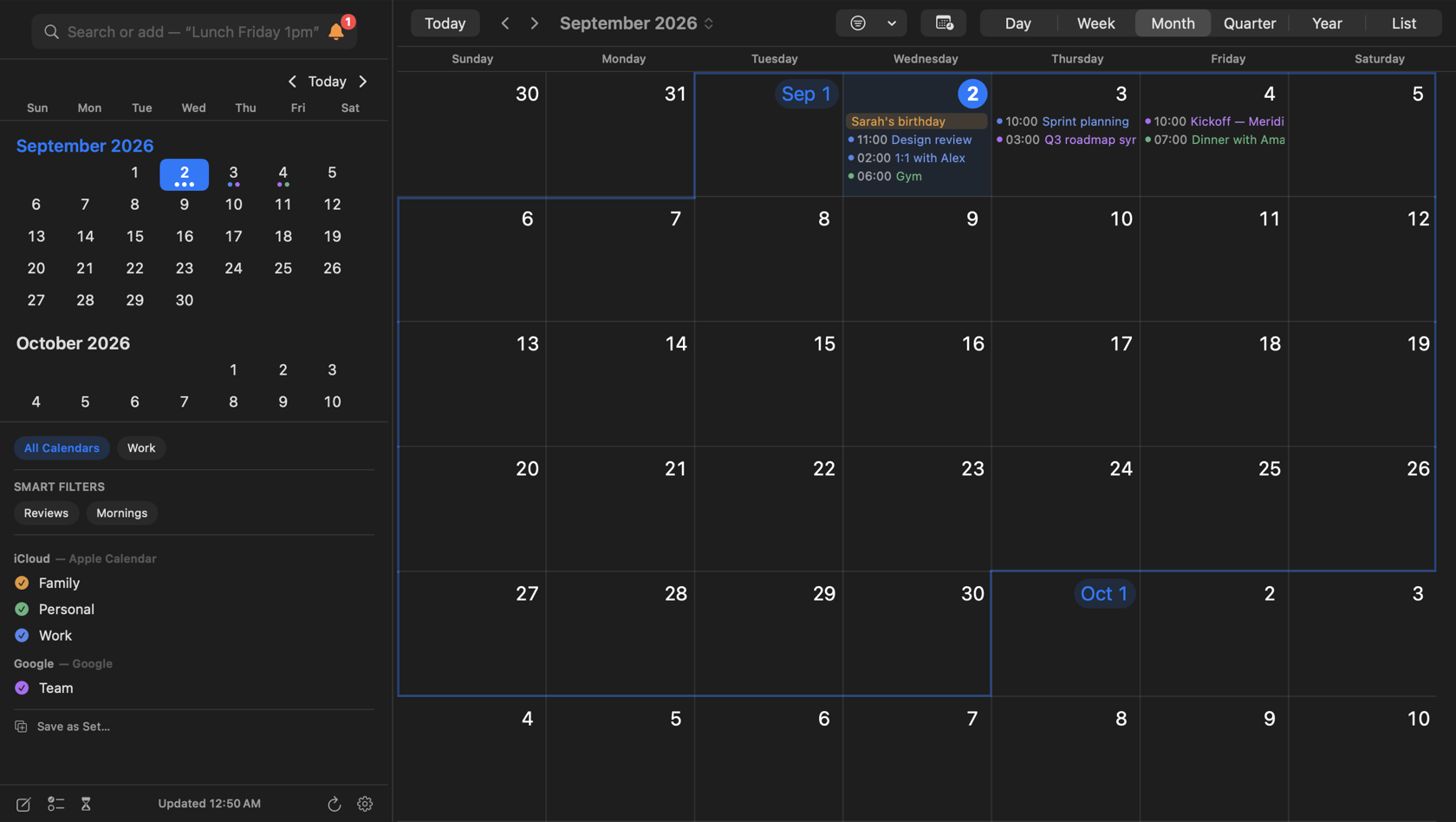
The calendar window's leading column is now a mode, chosen under Settings ▸ Appearance ▸ Calendar ▸ Sidebar or View ▸ Sidebar. Agenda keeps the panel's day list beside the calendar as before. Months trades it for a scrolling run of months, so a whole quarter is a glance away. Calendars keeps the mini month with the calendar list pinned open beneath it, and Months and Calendars splits the column between the two.
Hidden removes the column altogether, and the footer's buttons — New Event, Reminders, Countdowns, Refresh, Calendars and Settings — move up beside the month title so nothing goes with it.
The same catalog on iPhoneiOS
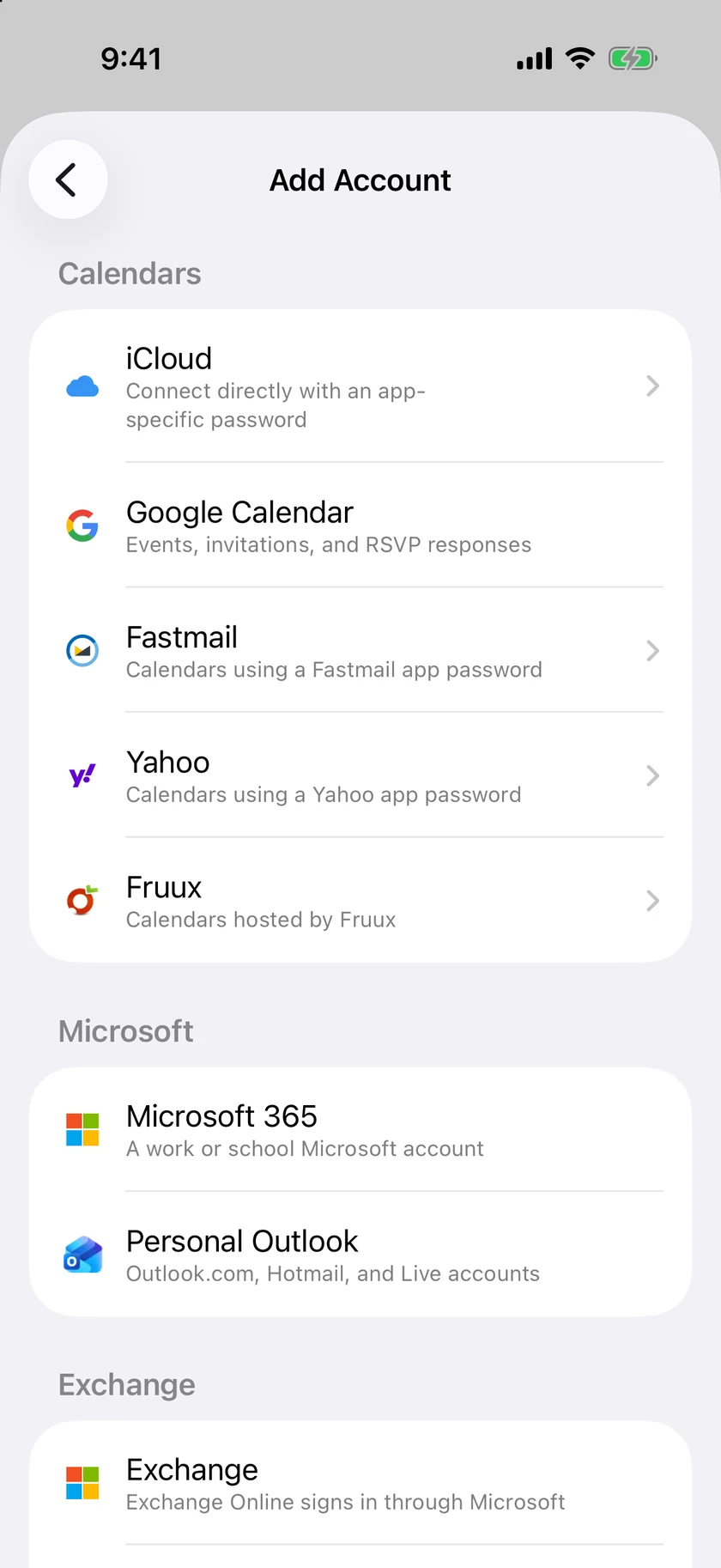
Settings ▸ Accounts ▸ Add Direct Account… on iPhone offers the same providers, grouped by kind: Calendars, Microsoft, Exchange, Tasks, Other Sources and Meeting Services. iCloud, Fastmail, Yahoo and Fruux come with their server address filled in and a link to where each issues an app-specific password; Google and Microsoft sign in with their own screens.
Direct connections sync inside InstaCal, and the credentials stay on the phone.
Fewer weeks, taller daysiOS
Month view fits as few as two weeks on screen or as many as six. Set Weeks Visible under Settings ▸ Appearance ▸ Month View, or pinch the grid itself when the pinch gesture is set to Density.
With three weeks showing, each day is tall enough for several event titles before the overflow count takes over, and the grid still scrolls as one continuous run of weeks with the selected day's outline riding along.
Work days onlyiOS
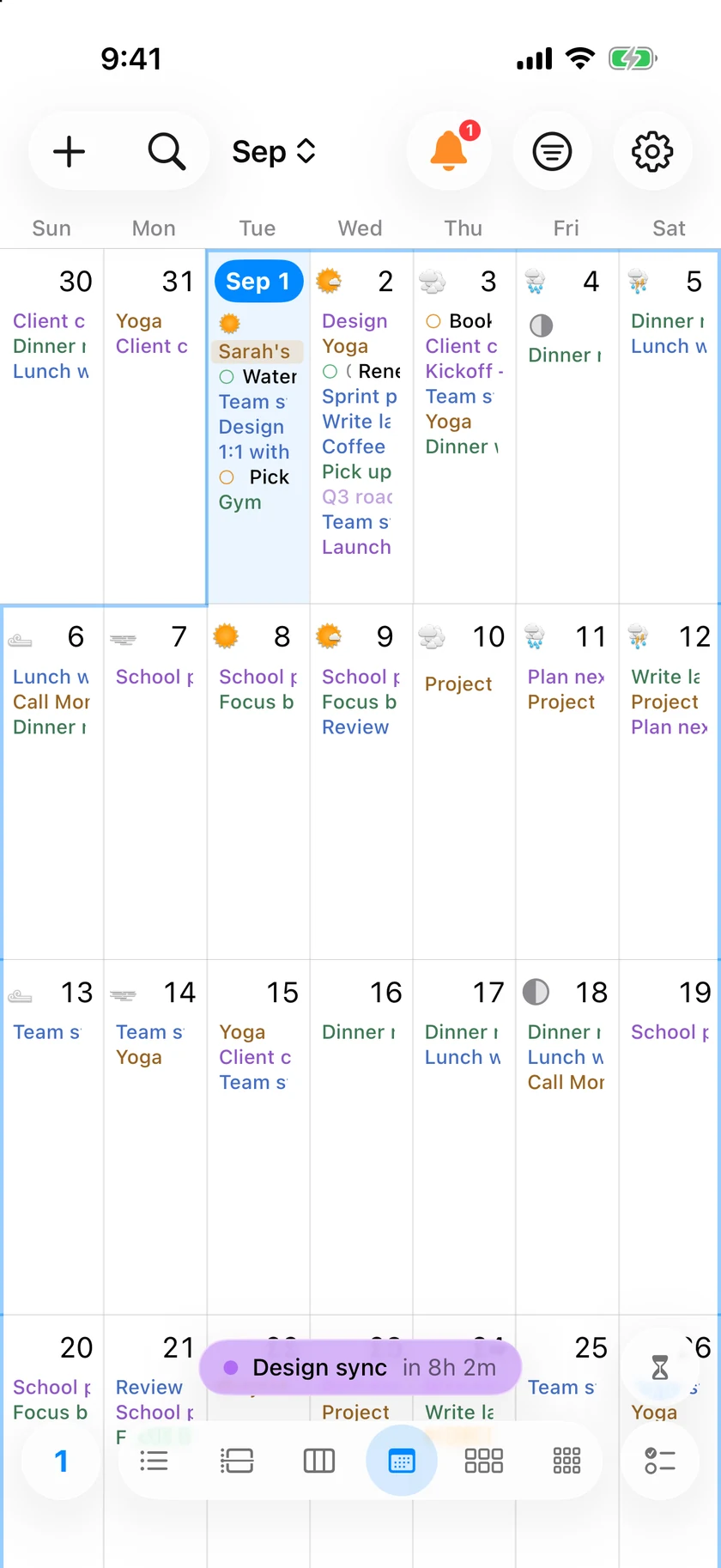
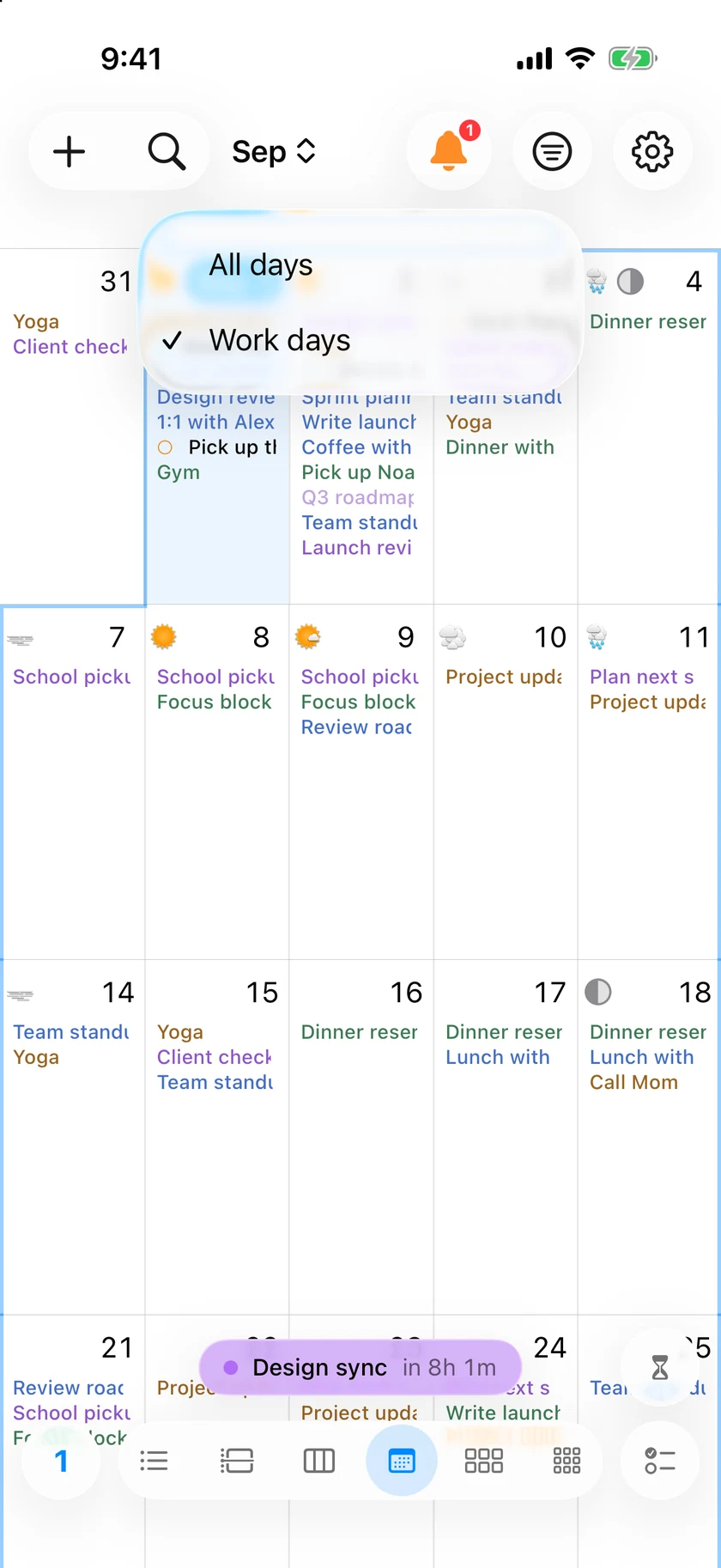
Tap the weekday header in Month view and choose Work days, and the weekend columns step aside. Monday through Friday take the whole width, so every working day gets more room for its titles.
The same switch lives under Settings ▸ Appearance ▸ Month View ▸ Days Shown, and All days brings Saturday and Sunday back.
Plus 23 smaller changes — fixes, tidy-ups and one-line wins that didn't need a paragraph. See every line →
Everything in this release
- Browsing is instant, years deep. Your calendars keep a local mirror of about six years of events and sync only what changes, so any month — 2024 or 2029 — paints the moment you arrive, online or offMac
- Every view scrolls like a native calendar. Month is one continuous run of weeks, Quarter a grid of thirteen weeks with the month boundaries ruled as seams, Year a run of month rows four across, and Week slides sideways through your days without end — two to seven at a time, three by default, with hours that stretch to fill a tall windowMac
- Calendars connect directly, without going through System Settings first. iCloud, Fastmail, Yahoo and Fruux arrive with their server address filled in and a link to where that provider issues an app-specific password; any other standards-based server goes in under CalDAV. Subscribe to a webcal, .ics or HTTPS feed with an optional password and a re-check interval of your choosing, and Todoist tasks sit alongside your reminders — added, rescheduled, completed and reopened with their priorities intactMac
- Connect Zoom and the event editor will mint a Zoom meeting on any calendar, not only the ones whose provider offers Meet or Teams. The meeting belongs to the event, so it travels with it between calendars and goes away when the event does
- A conflict tells you what it costs. An overlapping event gets a card naming the other event, the exact minutes in dispute, and a timeline drawing both on one axis. Click it for the ways out — an open time to move to, shortening it, marking it free. An event that only falls outside your working hours reads as a note rather than an alarm, and a calendar you can see but cannot act on can stay out of conflict checking entirelyMac
- Before a change touches an event's guests, InstaCal asks whether to email them — the same Send / Don't Send choice Google Calendar offers — for edits, reschedules, moves, deletes and new invitationsMac
- The calendar window's sidebar is a mode. Settings › Calendar › Sidebar chooses Agenda, a scrolling run of Months, the Calendars list, both together, or Hidden — and with no column, the toolbar moves up beside the month title. The window opens in a fraction of a second, views re-flow live while you drag its corner, and Settings switches panes instantlyMac
- Month view can show work days only — the weekend columns step aside so the working week gets the whole width, switched in Settings or by clicking the weekday header right on the grid. Month opens on the current week, and a long title ends on a whole letter instead of being chopped through oneMac
- Google Calendar, Microsoft 365 and Outlook, and Apple's Calendar are each handled reference by reference. Outlook recurring events show their titles and Outlook all-day events land on the right day; Google's typed events — birthdays, Gmail flights, focus time — save where they used to fail and explain the rule where they can't; an Apple Calendar edit keeps its location alarms and custom sounds; and a calendar two Google accounts share appears under both, with the account that can write to it owning your edits
- Moving an event to another calendar sticks: it re-files on the spot, stays put through a refresh, and a move made elsewhere is noticed and repaired within a refresh. Reminders made in Siri or the Reminders app appear as soon as InstaCal notices themMac
- When InstaCal can't see your reminders or your calendar, the list says so — with a Set Up… button that asks for access, or a pointer to the right pane of System Settings — instead of reading as an empty day. And when the menu bar item isn't on screen, dropped past the camera housing or hidden by Ice or Bartender, Settings › Menu Bar says which, and relaunching the app opens the panel with a button to fix itMac
- Ask for what's missing from inside the app. Settings › General › Request a Feature takes a type, a one-line summary, details and an optional screenshot, and lands with the people who build InstaCal — no mail client, no accountMac
- The iPad has the whole toolkit: a + for events and reminders, the search and quick-add field in the sidebar — type "Lunch Friday 1pm" and the card fills itself in — the calendar filter, a Reminders toggle, a long press on any empty hour that opens the full editor, Command-R to refresh, and event details, day lists and reminder editors that open as proper sheetsiOS
- Reminders are a hold away on the iPhone: hold the + for Add Event or Add Reminder, and over the Reminders list a plain tap adds a reminder. Refresh is a command of its own under Settings › Button Layout, ready to drag onto any bariOS
- Browsing is instant, years deep. Your calendars keep a local mirror of about six years of events and sync only what changes, so any month — 2024 or 2029 — paints the moment you arrive, online or off. The agenda renders two years ahead, so a fling carries as far as you throw itiOS
- The weekly strip swipes endlessly in either direction and shows two to seven days at a time — three by default — with hours that stretch to fill a taller screen. A busy week opens and swipes without stutter, the all-day strip shows every all-day event instead of stopping at four, and Quarter is one continuous grid of thirteen weeksiOS
- Month view is yours to shape. Fit as few as two weeks on screen or as many as six, from Appearance or by pinching the grid; show work days only, so the working week gets the full width; open on the current week or the top of the month; and Today is a home button — one press lands on today's week, a second opens today's cardiOS
- Calendars connect directly, without going through the Settings app first. iCloud, Fastmail, Yahoo and Fruux arrive with their server address filled in and a link to where that provider issues an app-specific password; any other standards-based server goes in under CalDAV. Subscribe to a webcal, .ics or HTTPS feed with an optional password and a re-check interval of your choosing, and Todoist tasks sit alongside your reminders — ticking one off in a widget completes it in TodoistiOS
- Before a change touches an event's guests, InstaCal asks whether to email them — the same Send / Don't Send choice Google Calendar offers — for edits, reschedules, moves, deletes and new invitations. The Watch and Shortcuts keep sending automaticallyiOS
- Moving an event to another calendar sticks: it re-files on the spot, stays put through a refresh, and a move made on the web or your Mac is noticed and repaired within a refresh. Reminders made in Siri or the Reminders app appear when you return to InstaCaliOS
- When InstaCal can't see your reminders or your calendar, the list says so — with a Set Up… button that asks for access, or a pointer to the right page of the Settings app — instead of reading as an empty dayiOS
- Fixed: returning from the background no longer leaves the agenda, Month and Settings stuck until you force-quit. The agenda tracks your finger faithfully — background refreshes and history loads can no longer freeze the scroll or yank the list awayiOS
- Ask for what's missing from inside the app. Settings › About › Request a Feature takes a type, a one-line summary, details and an optional screenshot from Photos, and lands with the people who build InstaCal — no mail client, no accountiOS
