A new InstaCal for Apple Watch.
The Watch app now opens to Now, a page that follows your day, with pages, cards and layouts you arrange yourself, a to-scale Dayline, and a live preview of it all on iPhone. The mini calendar gains Bold Numbers on every device.
A first page that follows your dayiOS
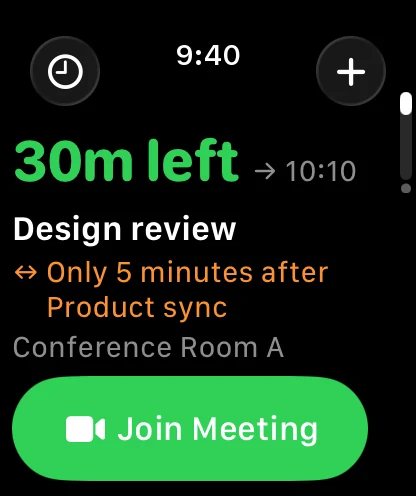
Raise your wrist mid-meeting and Now says how long is left, with Join under your thumb. An hour later it is telling you when to leave for lunch. After dinner it is tomorrow. One page, and it is never showing the same thing for long.
The shape of the dayiOS
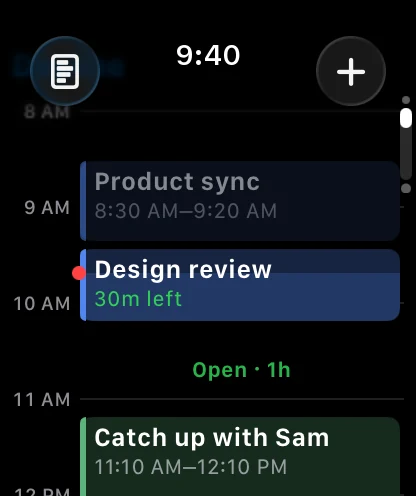
Dayline draws the day to scale, so a long meeting looks long and the open hour before lunch is named for what it is. Flip it to two columns when tonight's question is really about tomorrow morning.
Try it on before you wear itiOS
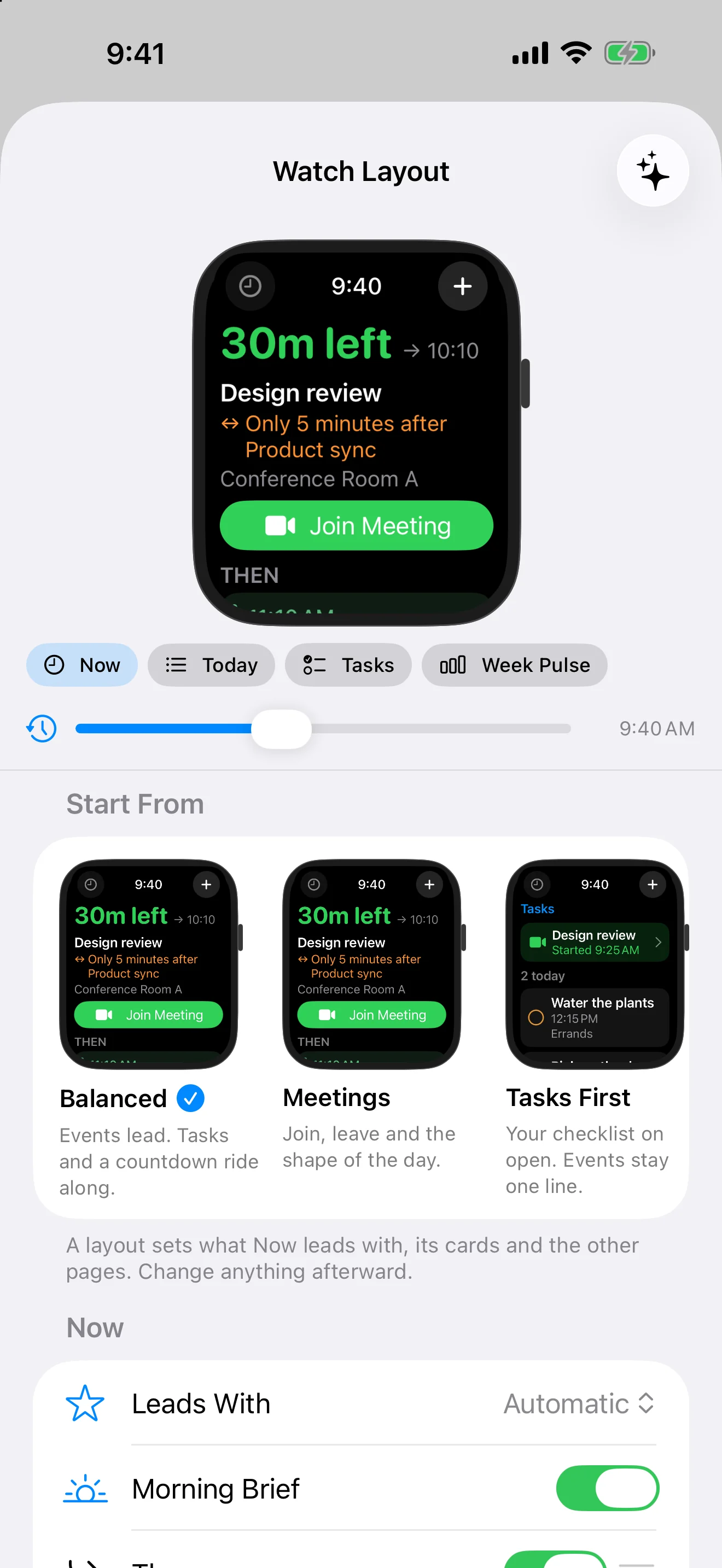
Settings, Apple Watch, Layout shows your Watch on your iPhone, running your real day. Slide the clock from breakfast to bedtime, tap a layout, drag pages and cards into order. Everything is on the Watch too, under Customize.
The same judgment on your watch faceiOS
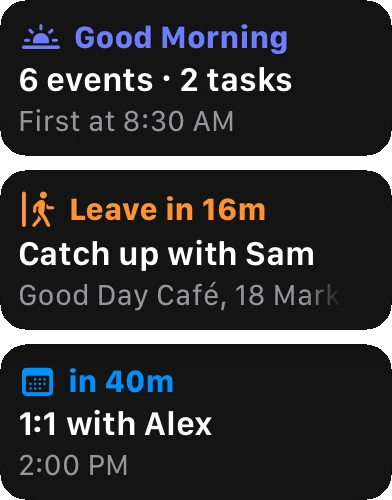
The new Now complication leads with whatever the Now page would, in every size and in the Smart Stack. Long titles fade at the edge instead of ending in dots, and a tap always opens what the face was showing.
The month, a turn of the crown at a timeiOS
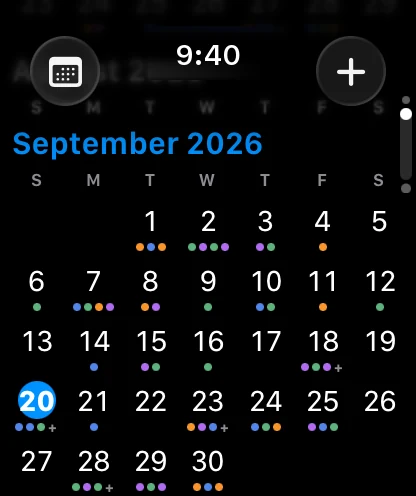
Month is the month view you know from iPhone, on your wrist. Turn the Digital Crown and the year rolls by under a title that always says where you are. Every event is a dot in its calendar's color, and any date opens its day, even one months away.
Cross off the daysMaciOS
A countdown can now be a paper calendar you mark. Turn on Cross Off Countdown Days and the countdown opens onto its own grid, with an X through every day from the start up to today. Only today's square is yours to mark, which is the point — the rest is the record, not the ritual.
The days behind you cross themselves off, so coming back after a week away shows the chain as it actually was rather than a gap where you forgot to check in. Cross Off From decides where the run begins. Turning the setting off again keeps what you marked instead of throwing it away.
Plus 23 smaller changes — fixes, tidy-ups and one-line wins that didn't need a paragraph. See every line →
Everything in this release
- Countdowns cross off their days. Turn it on and a countdown opens onto a paper calendar, with an X on every day from the start to today and today's square yours to mark.
- Choose what opens your links: the browser for websites, the app for Google Meet, Zoom and Microsoft Teams, and Apple Maps or Google Maps for locations. Right-click any link for a one-off choice.Mac
- Choose how all-day events look: Filled, Muted Colors or Outlined, with text that stays readable on any calendar color. Widgets follow along.
- Go to Date understands phrases like "3rd Tuesday in October" or "in three weeks", and can ask Apple Intelligence on your device when the wording is unusual.
- In the agenda, all-day events stack as one tight strip with even space around the group, and titles that run out of room fade at the edge instead of ending in three dots, everywhere in the app.Mac
- Widgets read clearly in a tinted or monochrome widget style, and Now + Next and Up Next no longer go blank while a live countdown is running.Mac
- Bold Numbers for the mini calendar, on by default, so dates read at a glance and today still stands out.Mac
- Spotlight no longer treats yesterday's all-day countdowns, tasks and reminders as happening now at the stroke of midnight.Mac
- Choose what opens your links: the browser for websites, the app for Google Meet, Zoom and Microsoft Teams, and Apple Maps or Google Maps for locations. Long-press any link for a one-off choice.iOS
- The mini calendar above the agenda is only as tall as its month, so the agenda starts higher for most of the year.iOS
- A new InstaCal for Apple Watch. The app opens to Now, a page that leads with whatever the moment calls for: your morning at a glance, the next event counting down, time left in the meeting you're in, Leave or Join when it's time, a task coming due, and tomorrow once today is done.iOS
- Make the Watch yours. Choose your pages and their order (Now, Today, Tasks, Countdowns, Week Pulse, Month, Overview and the new Dayline), pick what Now leads with and which cards follow it, or start from a layout: Balanced, Meetings, Tasks First, Countdowns or Planner.iOS
- A new Now complication brings that same lead to your watch face and the Smart Stack, and every complication opens exactly what it shows.iOS
- Dayline draws your day to scale on the wrist, with the open stretches named and tomorrow alongside if you want it. A switcher in the corner jumps to any page in one tap.iOS
- Month is a real month view on the wrist: scroll through the year with the Digital Crown, see a dot for every event in its calendar's color, and tap any date to open that day, even months away.iOS
- See it before you wear it: Settings, Apple Watch, Layout on iPhone previews the Watch's real pages with your own schedule, at any time of day. Everything is on the Watch too, under Customize, and the two stay in step.iOS
- The Watch shows the calendars your iPhone shows, and follows along when you hide one. Or give it a Calendar Set or a selection of its own, from either device.iOS
- Countdown photos come to the wrist, and complications say more: Up Next is a ring that closes as the event approaches, and every corner complication shows a number, such as minutes left, tasks overdue or days to go, instead of an icon.iOS
- Watch cards show the detail rows you chose in Appearance, and long text fades out instead of being cut off.iOS
- The Watch leans on your iPhone less: Quick Add understands your sentence on the wrist, Search falls back to the week your Watch already holds, and anything that does need the iPhone goes through even when InstaCal isn't open there.iOS
- In the agenda, all-day events stack as one tight strip, and titles that run out of room fade at the edge instead of ending in three dots, everywhere in the app.iOS
- Widgets read clearly on a tinted or clear Home Screen, and complications use two tones on a tinted watch face. Now + Next and Up Next no longer go blank while a live countdown is running.iOS
- Show All and Hide All in Calendars, Bold Numbers for the mini calendar and week strip, week numbers in Quarter, and the month named above the iPad sidebar's mini calendar.iOS
