Plan the week, privately
Reusable calendar workspaces, conflict-free meeting suggestions and cross-calendar Busy blocks come to InstaCal.
Your place in the List, reflected everywhereMac
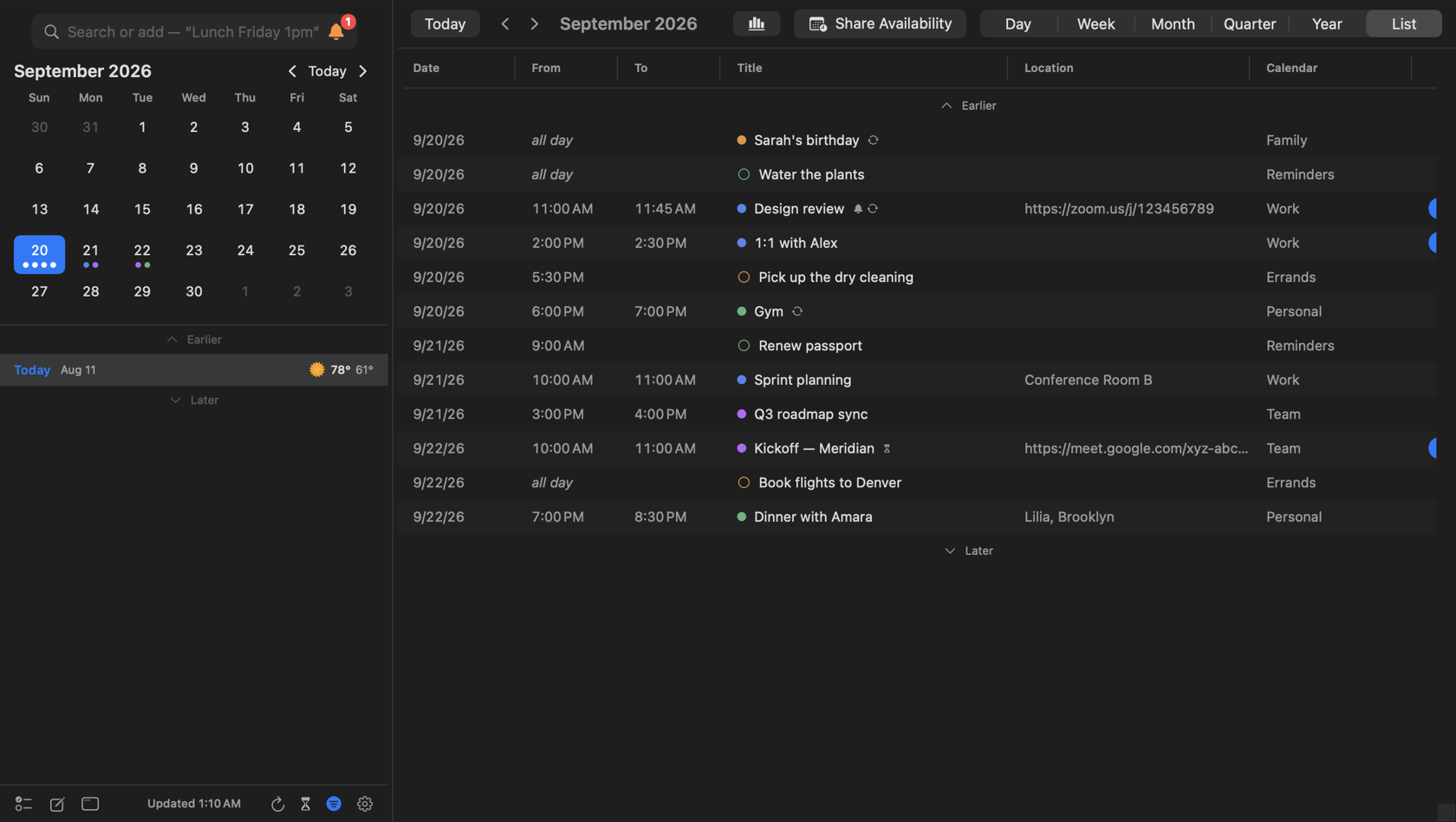
Scroll the full-window List and both calendars move with the events in view. The mini calendar, selected day and main month heading stay together while earlier and later ranges load, so the date in the chrome never drifts away from the rows beneath it.
Month names turn like a vertical dial: a quick flick gets a tight transition, a slower scroll has a little more room to settle, and every title stays whole. At compact window widths, controls reflow and event details undock before either pane gets squeezed.
Every button, where your thumb expects itiOS
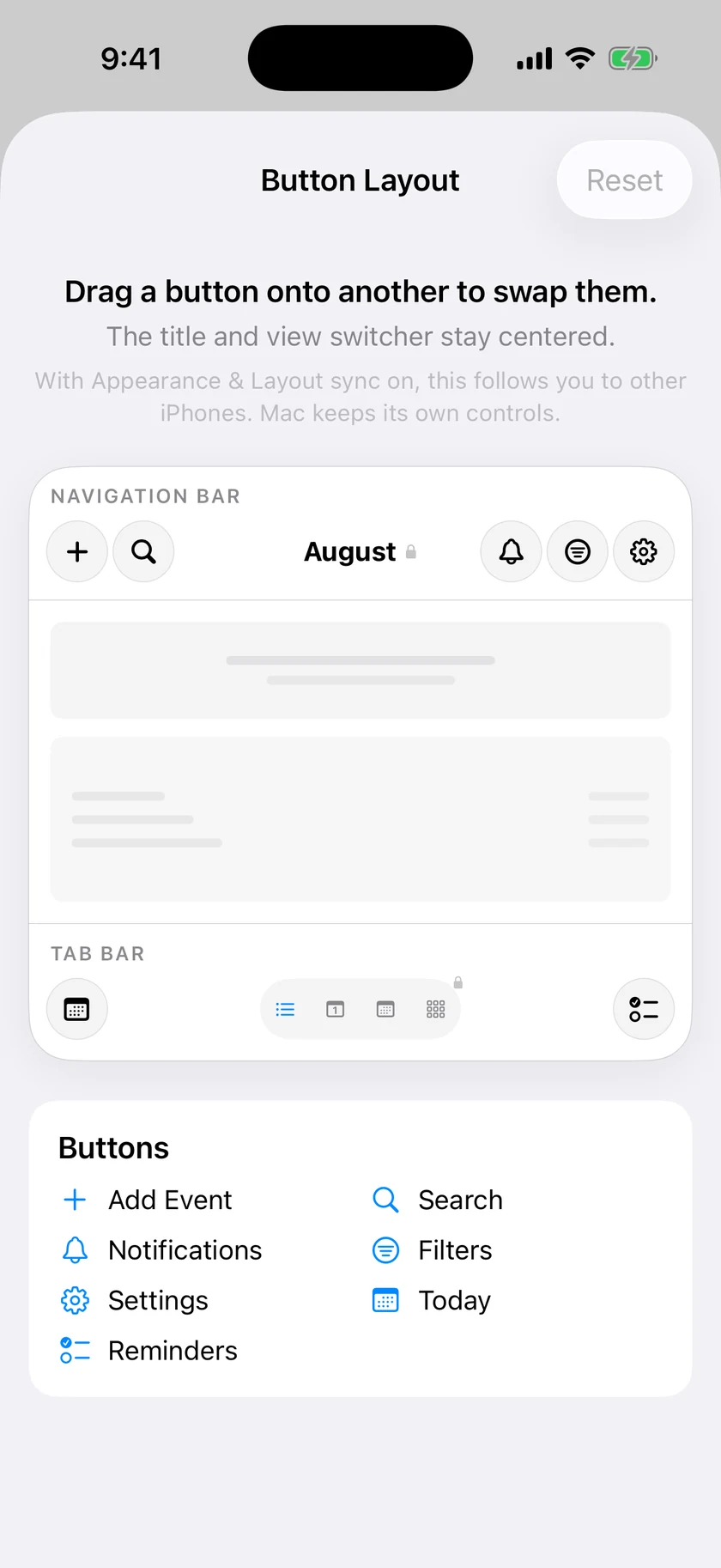
Choose Reorder, then drag any iPhone command onto another to swap their places. Add Event, Search, Notifications, Filters, Settings, Today, Reminders and Countdowns can move around the fixed month title and view switcher, with a shell preview showing exactly where each button will land. Done applies the arrangement; Cancel leaves the live bars untouched.
Countdowns stays out of the standard layout until there is something active to follow, but an explicit custom placement keeps it visible. Choose the compact view switcher on the same screen and Reminders and Countdowns stay in its menu without hiding the other commands you placed there. The arrangement follows you to other iPhones when Appearance & Layout sync is on; Reset restores both the standard command order and expanded switcher.
Browse the calendar without leaving the widgetiOS
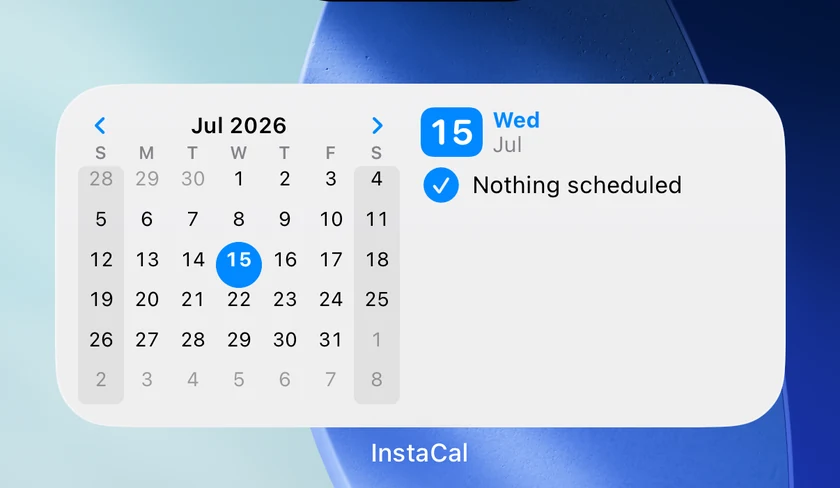
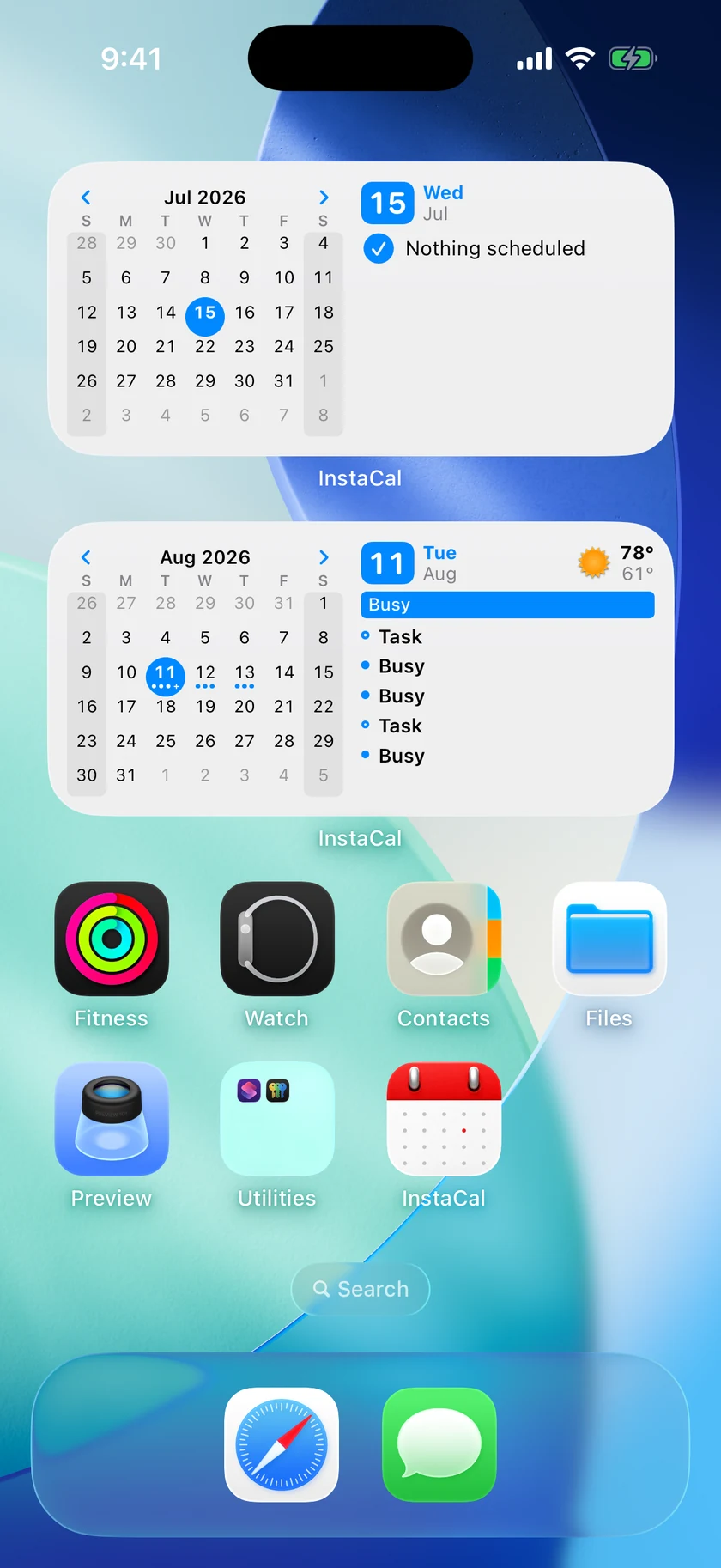
Up Next + Calendar browses entirely in place by default. Use the arrows to move through complete calendar months, tap any date, and the agenda beside it immediately becomes that day's events and reminders without leaving the widget. Turn off Interactive Calendar for a placement when you prefer date taps to open InstaCal instead.
The capture is the live result after selecting July 15: the month title, boxed selection and adjacent Wednesday, July 15 agenda all agree, with the navigation arrows ready for another month. Taps now hand state directly to the next render, so the widget no longer flashes an old page while it catches up.
Your calendar, as a workspaceMac
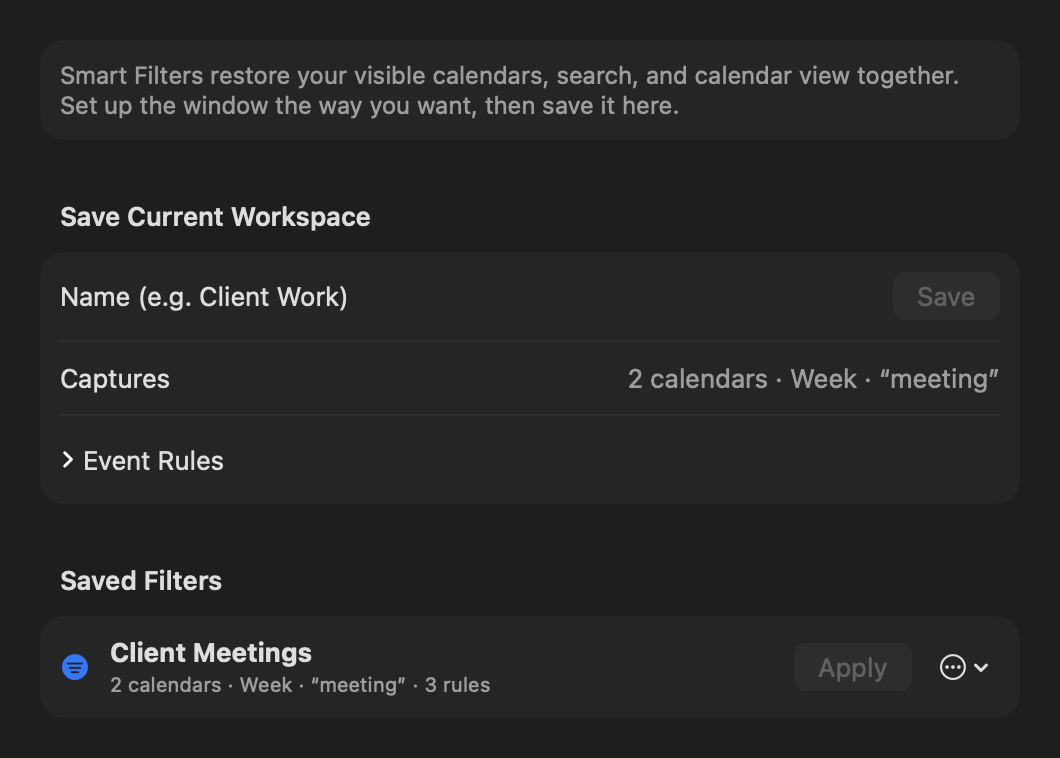
Smart Filters save more than a search. Pick the calendars you want, add rules for the events that matter, choose a view, and save the whole arrangement as a workspace you can return to.
Calendar ordering now carries through the rest of InstaCal too. When events begin together, the order you chose decides how they appear in the panel, calendar window and widgets.
Find the time that actually worksMac
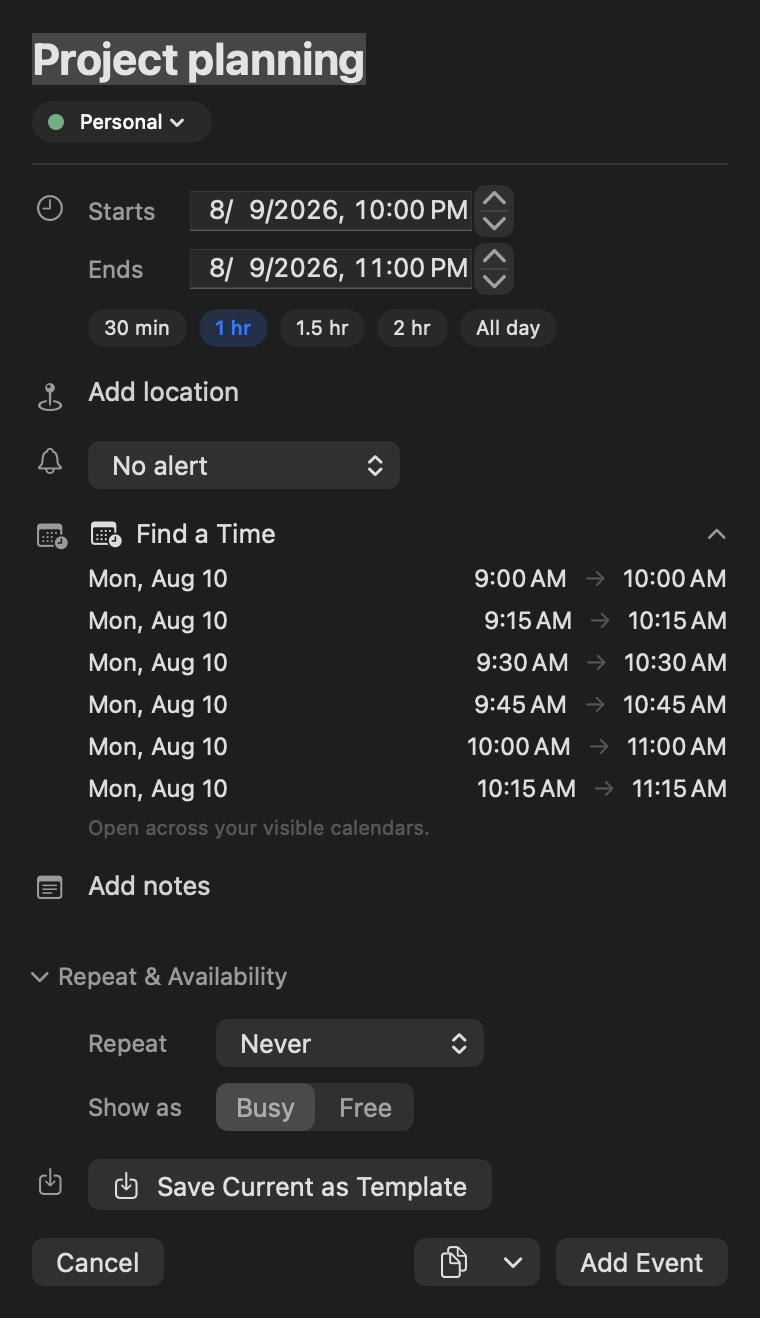
Find a Time checks the calendars in front of you and offers open meeting slots. Working hours and conflict warnings keep suggestions inside the day you meant to work, while travel estimates account for the journey when a meeting has somewhere to be.
Templates take the repetition out of setting the meeting up again: save only the event or reminder fields you want to reuse, under a name that makes sense later.
Choose the warnings that matterMaciOS
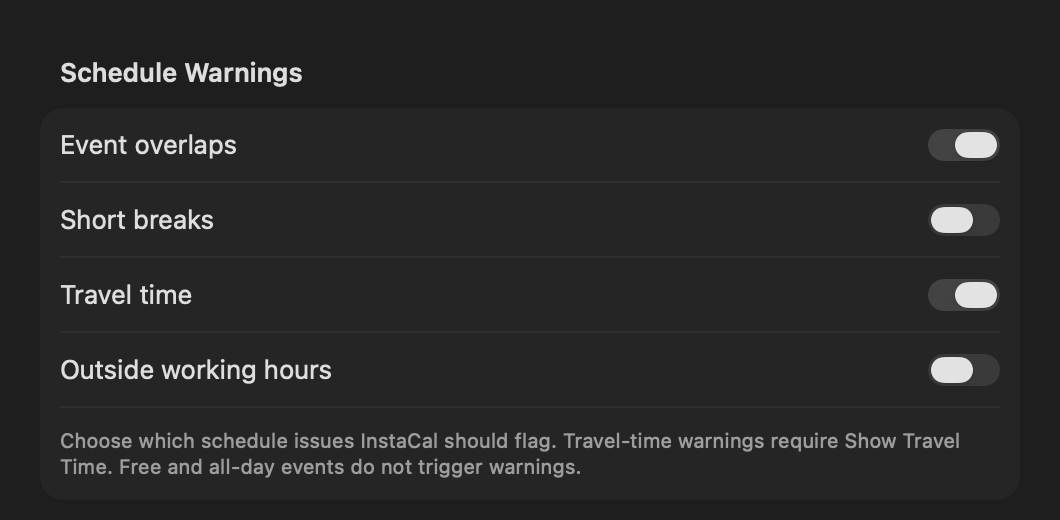
Schedule warnings are four independent choices. Keep event overlaps and travel pressure visible without being told about short breaks or plans outside working hours—or choose any other combination that fits how you use your calendar.
Event-overlap and travel-time warnings start on. Short-break and outside-working-hours warnings stay off until you ask for them, and travel pressure appears only when Show Travel Time is enabled.
Share busy, not privateMac
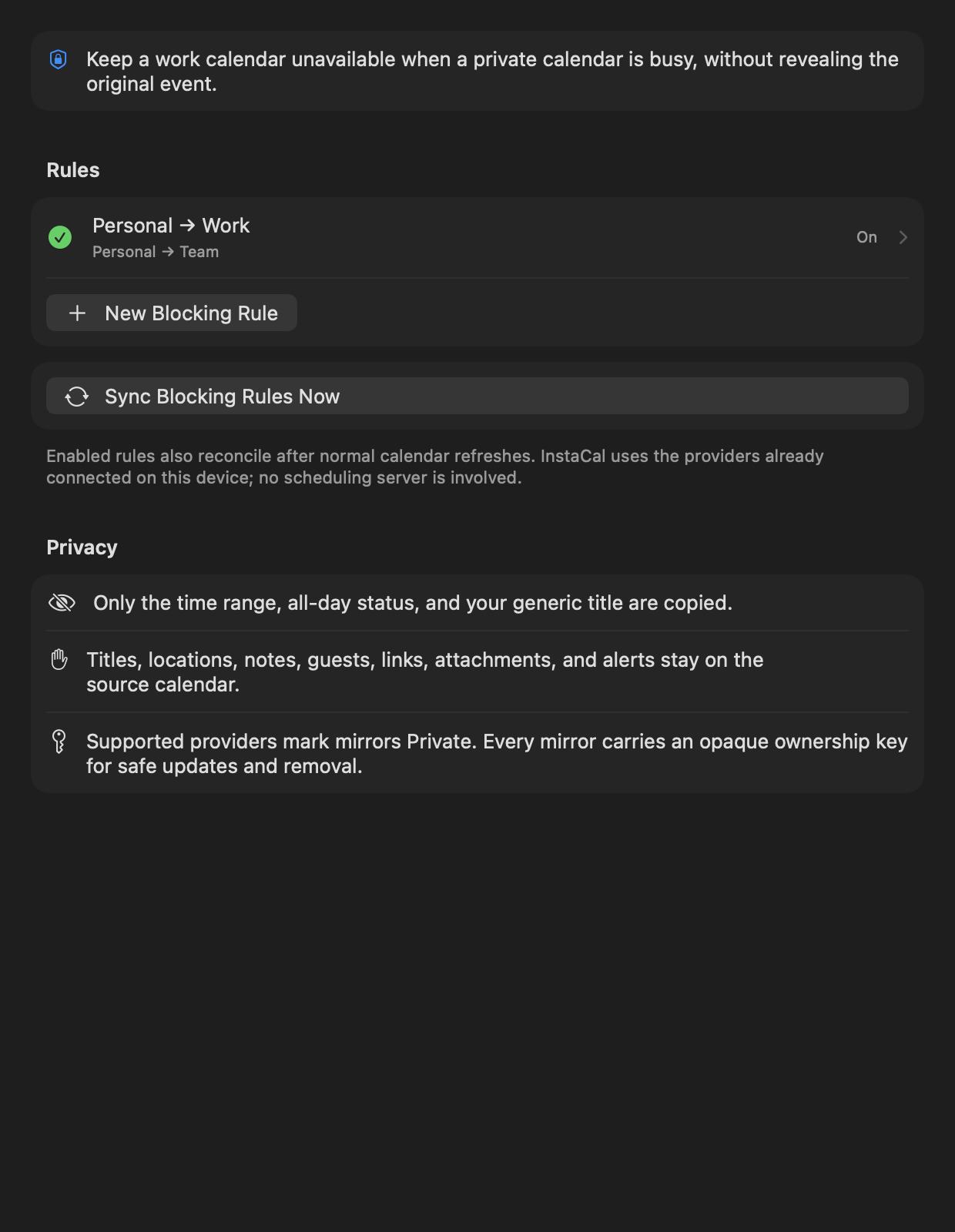
Conflict Blocking keeps one calendar unavailable when another is busy without copying the private event. The destination gets only a generic Busy block; titles, locations, notes, guests, links, attachments and alerts stay where they belong.
The same release brings attachments and richer provider details to supported Google and Outlook events, plus Calendar Sets that can follow Apple Focus modes and restore your previous selection when the Focus ends.
The dates that matter, already on your calendariOS
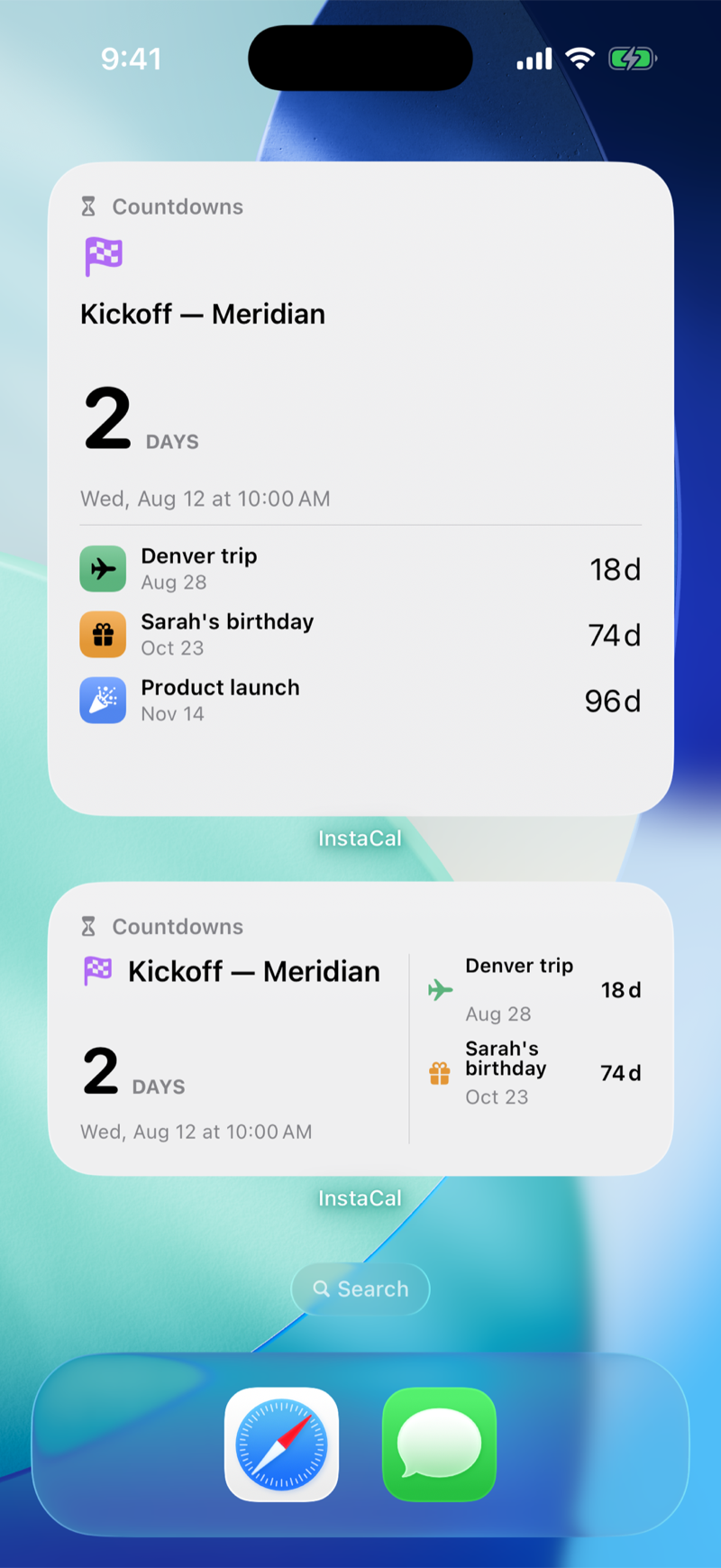
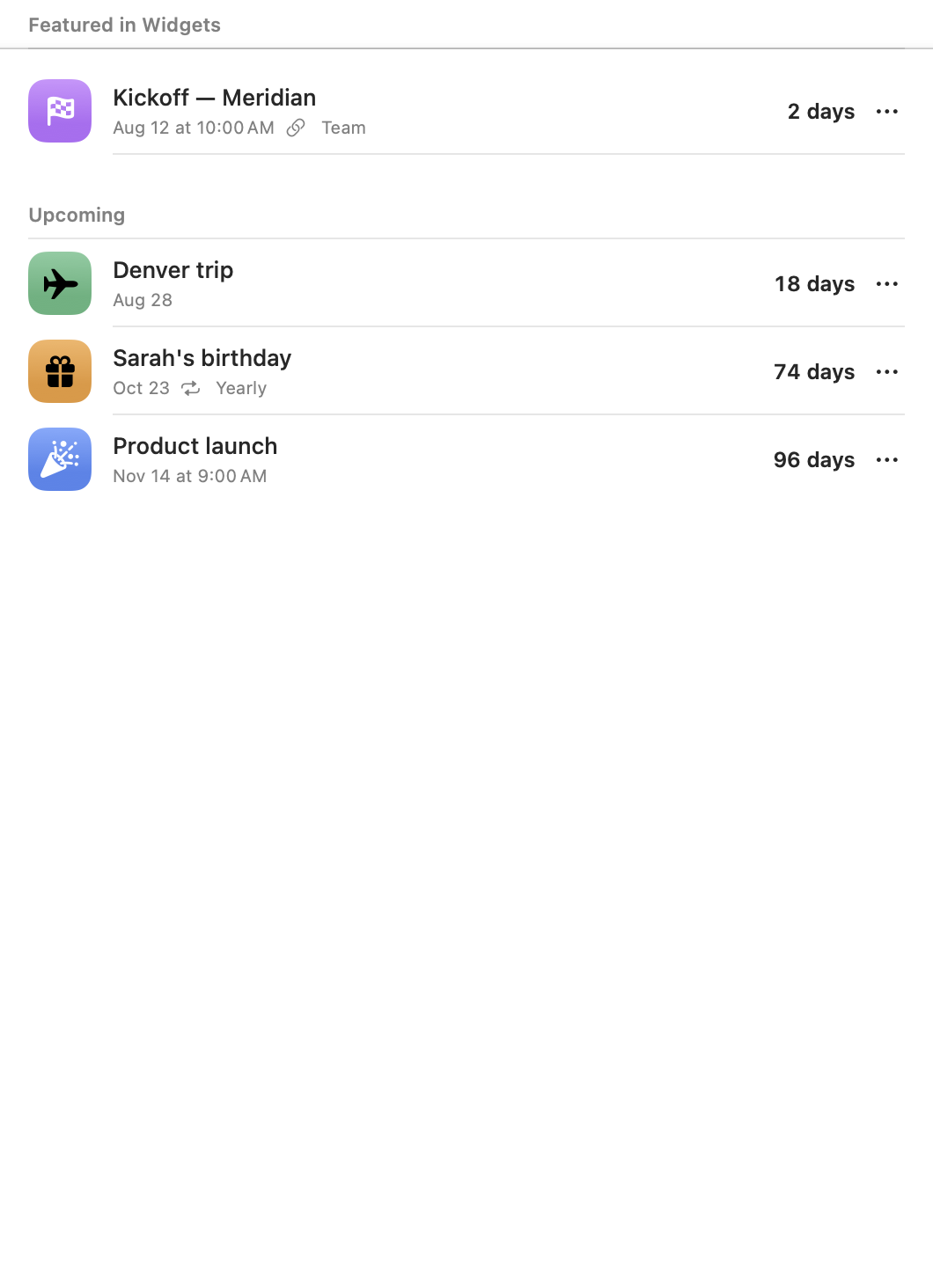
Choose Add to Countdowns on any event, or add a date of your own. A calendar-linked countdown keeps the event's name, time and calendar color, and opens that exact event when you tap it. A standalone date — a birthday, a trip, a launch — lives nowhere else and takes an optional time, a yearly repeat, a symbol and a color.
Widgets scale with the space you give them: one big date at small, three at medium, five at large and nine at extra large, plus inline, circular and rectangular versions for the Lock Screen. Each Countdowns widget can watch its own date, so two widgets need not show the same thing.
The same important dates, ready on your MacMac
Settings ▸ Countdowns keeps the dates you care about in one place. Add any calendar event from its actions menu, or create a date that lives nowhere else. Event-backed rows carry their source calendar; standalone dates stay directly editable.
Desktop widgets show one big date or up to nine, and each one can watch its own date. Yearly dates advance to the next occurrence on their own, and a countdown whose event goes missing says so plainly and keeps its last known date rather than pretending.
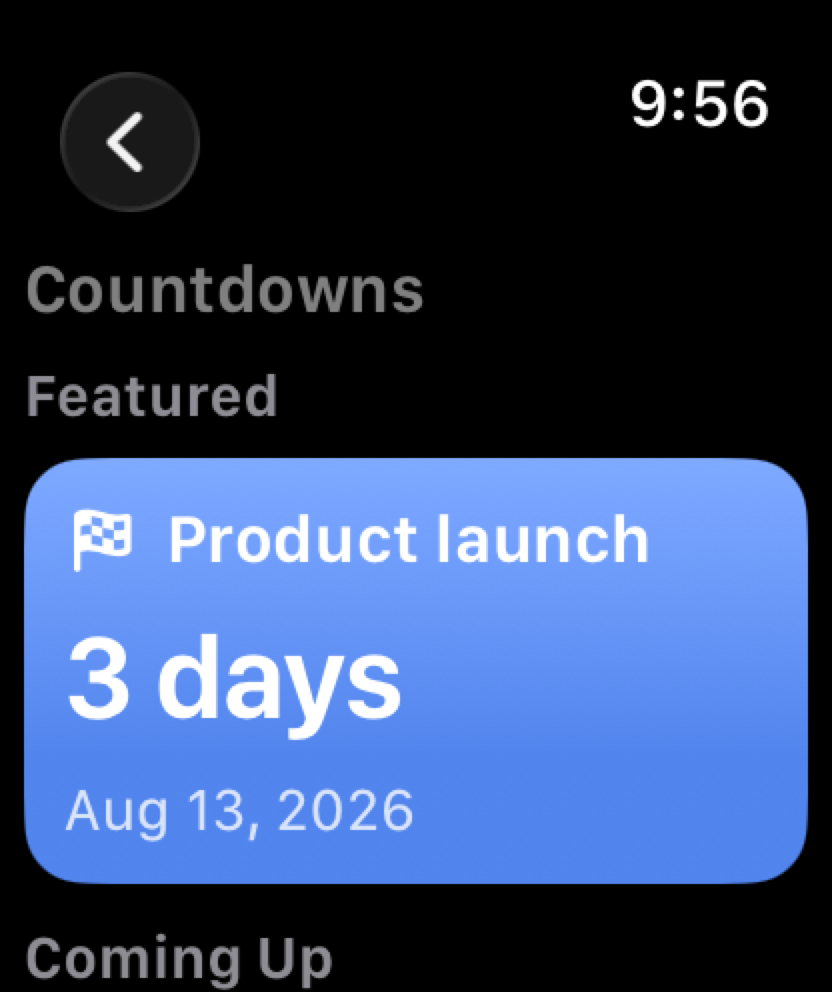
Countdowns on your wristiOS
Apple Watch gets the full list, a detail view for every date, and a complication of its own. The featured date leads, and a linked countdown opens the calendar event behind it.
Countdowns arrive alongside a broader Watch release: Conflict Check, Join Next and Open Window complications; editing, moving, rescheduling, answering and snoozing from the wrist; Month and 3-Day views; and honest queued status when your iPhone is out of range.
The next date that matters, in the menu barMac
Your featured countdown can sit in the menu bar, beside the date and your next event. Show it with its title or as a compact value, and give Countdowns a keyboard shortcut so the list opens from anywhere.
Everything shares one length budget, so adding a countdown never crowds out the date or the event you are about to walk into.

Already on your calendarMac
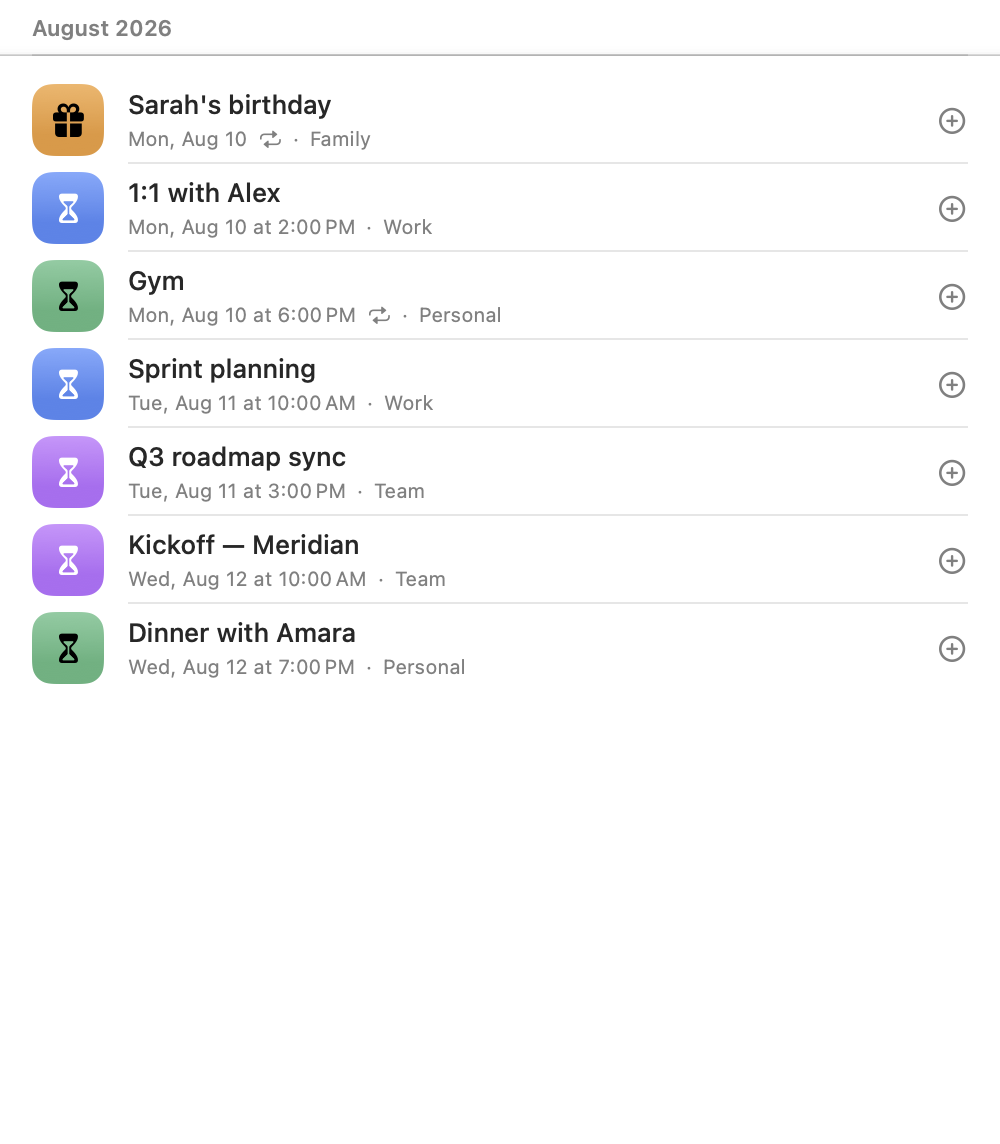
From Calendar turns any upcoming event into a countdown without hunting for it in the month grid. A birthday, a trip, a launch, a review — pick it from the list and it keeps the event's name, date, calendar and colour.
Countdowns on repeating events now follow the series rather than expiring after one occurrence, so a birthday or a weekly review rolls forward on its own. Name a countdown after a birthday or anniversary and a yearly repeat is suggested for you, and the symbol is chosen from the name — in every language InstaCal speaks.
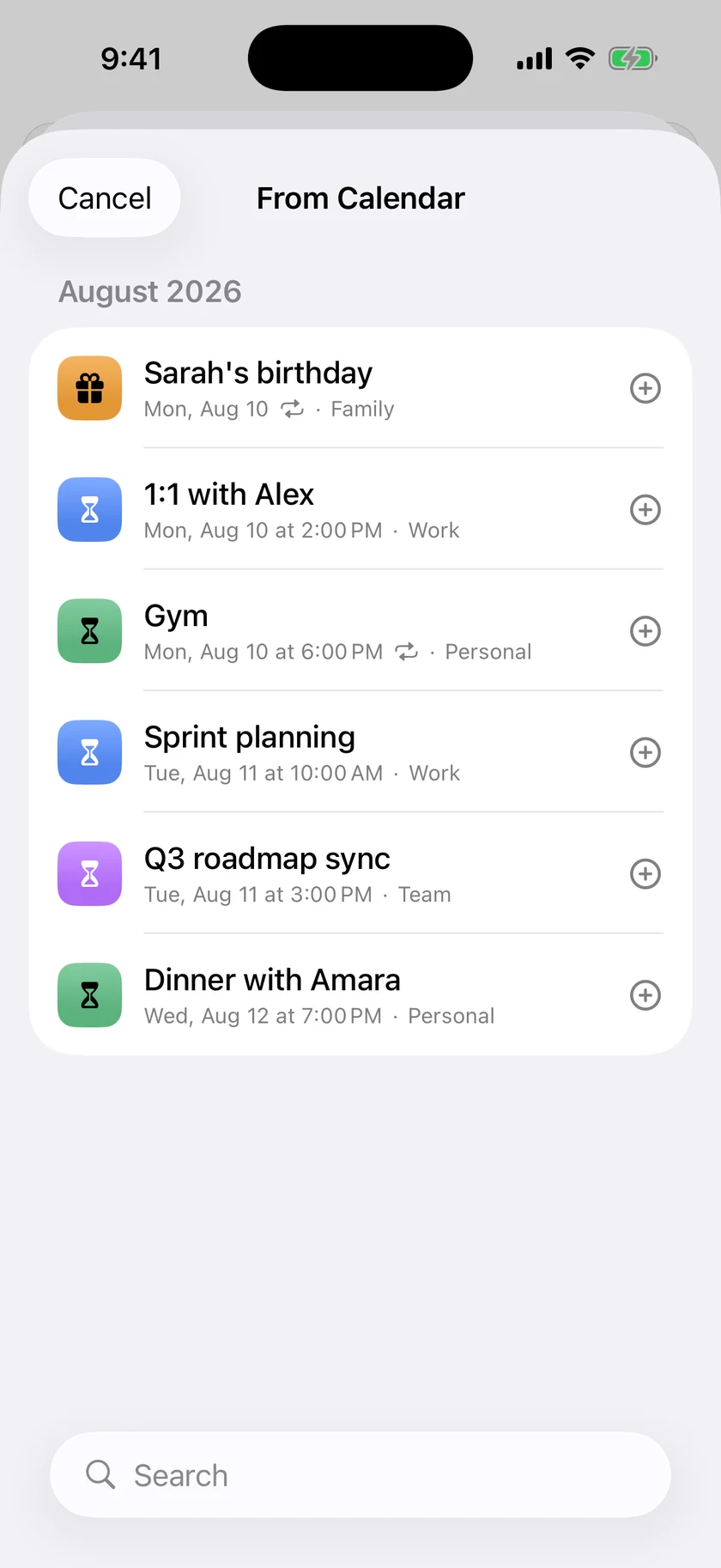
Already on your iPhoneiOS
From Calendar puts the same upcoming-event chooser on iPhone. Pick a birthday, meeting, trip or launch from the list and InstaCal carries its name, date and source calendar into Countdowns.
Repeating events keep following the series instead of expiring after one occurrence, and tapping a linked countdown opens the calendar event behind it.
Every widget, its own wayMaciOS
Two copies of the same widget no longer have to agree. Each one carries its own Calendar Set, theme, font size, privacy mode, weather visibility and layout, so a widget on your desk can show full details while one on a shared screen shows busy time only.
Themes follow the system or lock to Light, Dark or a color of your choosing. And with iCloud settings sync, the countdowns, templates, appearance and planning defaults behind them stay consistent across your devices — with no InstaCal account, and three switches you can turn off individually.
Plus 20 smaller changes — fixes, tidy-ups and one-line wins that didn't need a paragraph. See every line →
Everything in this release
- Countdowns keep the dates that matter in sight. Add any calendar event, or a date that lives nowhere else, and watch it from the desktop, a widget or the menu bar itself. One set on a repeating event follows the series, so a birthday or a weekly review rolls forward on its ownMac
- Ten widgets, each configured on its own — agenda, month, next event, now and next, week map, days ahead, countdowns and reminders, every one with its own calendar set, theme, text size, privacy and weather. And they act without opening the app: flip through months, page a busy day in place, look ahead a week at a time, and check off a reminder right on the widgetMac
- Invitations keep asking until you answer. A bell holds every unanswered one, including those on a calendar you have hidden, and you reply with Accept, Maybe or Decline from the agenda row, from a right-click on the calendar, or from the invitation itself. A meeting you have not answered is drawn as unanswered rather than settled, and one you declined stops taking up your dayMac
- Plan around what is already there. Availability Sharing turns your open times into text, images, PDFs or calendar files without publishing your calendar. Conflict Blocking mirrors private events onto another calendar as generic Busy blocks, details left behind. Schedule warnings flag overlaps, travel pressure and short breaks as notifications before the crunch rather than after itMac
- Smart Filters turn a search, a set of calendars, rules and view settings into a workspace you can return to. Calendar Sets can follow your Focus modes and restore the previous selection when the Focus ends, and quiet hours hold back every kind of interruption until the window closesMac
- The menu bar panel is yours to arrange. Drag its toolbar buttons into the order you want, hide the ones you never press, and put an Up Next bubble above them naming what is next and how long you haveMac
- VoiceOver reads the calendar rather than its pieces. Every agenda row, month chip, time-grid block and list row is one spoken sentence with its controls on the actions rotor, around seventy icon-only buttons gained real names, and Reduce Motion is honoured throughoutMac
- Calendars come in and out freely: import and export .ics files with a duplicate preview before anything is written, print what you are looking at, open and add event attachments, and keep Google and Outlook colours, categories, privacy and guest permissions intactMac
- Countdowns keep the dates that matter in sight. Add any calendar event, or a date that lives nowhere else, and watch it from the Home Screen, the Lock Screen, iPad and Apple Watch. One set on a repeating event follows the series, so a birthday or a weekly review rolls forward on its owniOS
- Twelve widgets, each configured on its own — agenda, month, next event, now and next, week map, days ahead, countdowns and reminders, every one with its own calendar set, theme, text size, privacy and weather, and text that follows your device's own Text Size. The calendars are interactive: Month pages between months, Today pages between days, Days Ahead and Week Map page ahead, a crowded day pages in place through "+N events", and a reminder ticks off right on the widget. Countdown to Next and Remaining Today join Week Map, Action Center and Next Event on the Lock Screen, and Action Center puts Add, Search, Today, Join and Directions one tap awayiOS
- Apple Watch becomes a place to act, not only to look. Edit, move, reschedule, answer and snooze from the wrist with honest queued status when the iPhone is away, eleven complications, and Wrist Notifications that can follow your FocusiOS
- Both bars are yours to arrange. Every position is shown — empty ones included — so a button is moved rather than traded, either side can hold it, and the view switcher is six spots you rearrange or fold into one compact button. Press and hold that button to jump somewhere and back. Anything you would rather not see goes into the switcher's menu or Hidden ItemsiOS
- The phone taps back. Completing a reminder, saving an event, crossing a day as the agenda scrolls, crossing a month in the grid, every button on the bars — each has its own weight, the press-and-hold jump taps hardest of all, and Settings ▸ Display ▸ Gestures & Navigation sets how hard it all lands: Off, Subtle or Standard, and picking a level plays itiOS
- VoiceOver reads the calendar, not its pieces. An agenda row, a month chip or a time-grid block is one spoken element with its controls on the actions rotor, navigation carries the VoiceOver cursor with it, a completed reminder, a sent RSVP and a refresh are announced, Reduce Motion is honored throughout, and the widgets, the Live Activity and the Watch speak what they showiOS
- Invitations keep asking until you answer. A bell holds every unanswered one, including those on a calendar you have hidden and those that arrived on another of your own accounts, and an invitation you haven't answered looks like one — a washed fill under a dashed edge on the phone, the widgets and the Watch, still counting as busy. You reply right from the agenda row, an hour tile or a month chip, a meeting you declined stops taking up your day anywhere — Up Next, Siri and the Watch included — and a Declined tab keeps every decline reversible, even one made on another deviceiOS
- Calendar Sets are built and kept on the phone. The filter's own checklist saves as a set, a set can be renamed or rewired in place, a whole account leaves the agenda in one tap, and a set can follow a Focus — filtering the moment the Focus starts, whether the app is open or not, with a switch to see everything for the rest of that FocusiOS
- Plan around what is already there. Schedule warnings flag overlaps, travel pressure and short breaks before the crunch, the Watch's Conflict Check and Open Window faces name the next collision and the free stretch big enough to use, and Conflict Blocking mirrors busy time onto another calendar without publishing what it isiOS
- Picking a date is one flick. Months run continuously with every day carrying its event dots, the date and time work as one control, and an event can move to another calendar on Google and Microsoft accounts as well as Apple onesiOS
- Multi-day events stay present on every day they occupy, all-day events wear solid calendar colours with contrast-aware text, and Join recognizes more than thirty meeting services in links, locations and notesiOS
- Your settings follow your devices through iCloud, with no InstaCal account — and nothing about you is collected, stored or analyzed by usiOS
