Ask about your day. See the days ahead.
Try Siri schedule answers and calendar changes on supported systems, see tomorrow in spare XL agenda space, and search your entries from Spotlight. Private calendars and App Lock protect what stays hidden.
Ask about your dayMaciOS
Ask for today's schedule, the next event or available time on enabled calendars. Ongoing and all-day events count, mirrored copies do not repeat, and an incomplete refresh is explained. On supported OS 27 systems, try creating and changing an event through Siri. Physical-device conversation routing remains a beta check; private calendars and App Lock protect both answers and edits.
More days in the same agendaMaciOS
Up Next + Calendar uses spare XL height for tomorrow and later dates while keeping the selected day first. Days Ahead and Up Next + Calendar also have extra-large portrait layouts where the system offers them. Sample-data view renders have been checked; gallery placement and Home Screen captures remain pending.
Find it from SpotlightMaciOS
Search across what you keep in InstaCal. Events, personal tasks, Apple Reminders, connected-service tasks and countdowns join saved templates, calendars, lists, Calendar Sets and Smart Filters. Notes, tags, checklist text, section names and attachment filenames help find their parent task or list. Open a result to reach its matching content.
Search includes every event loaded by InstaCal, without the old date window or item limit. Completed personal tasks and archived lists remain searchable. Event results use the system's date and time presentation with calendar metadata, removing the repeated fixed-date line.
On iOS 27 and macOS 27, try asking Siri about tasks, reminders and events. This beta supplies structured content; live contextual answers and final system-search presentation still need device verification. App Lock clears all search categories, and private content stays out of system search even while revealed inside InstaCal.
Your tasks, your calendarMaciOS
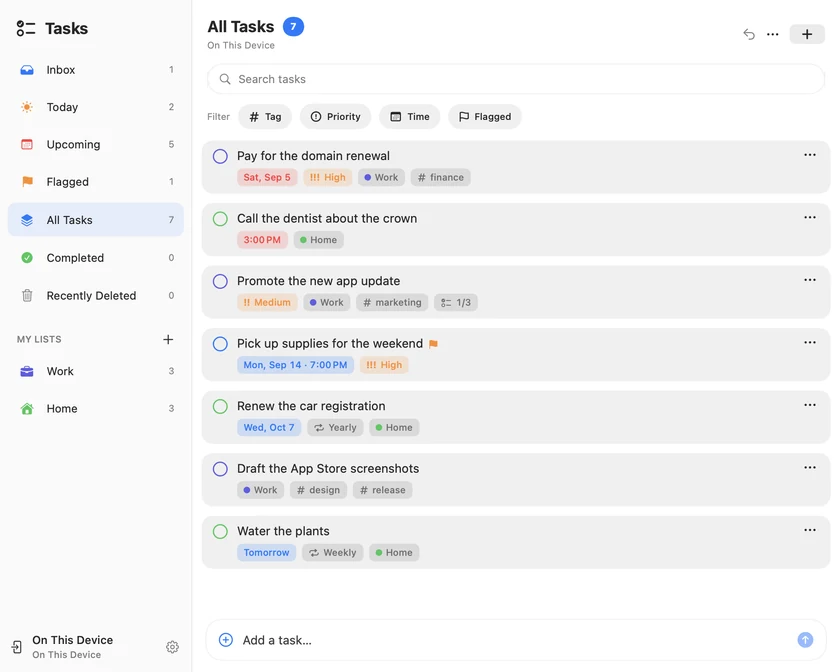
Give your own tasks a place beside your calendar. Keep a quick thought in Inbox, or organize a longer list with sections, tags, flags and checklists. Today and Upcoming bring planned work and approaching deadlines together; Completed keeps the progress you have made.
Tasks has its own library, separate from Apple Reminders, and needs no InstaCal account. On Mac, use the panel, calendar sidebar or full Tasks window shown here. On iPhone and iPad, open Tasks from the utility toolbar above your current calendar view.
The current TestFlight builds use On This Device storage. Tasks labels are translated in every supported language; iCloud task sync remains unavailable while production checks are completed. Google Tasks shows Coming soon while Google reviews access. Microsoft To Do and Todoist connect separately, and Google Calendar remains available. Deleted tasks can be restored for 30 days, and an exported task archive provides a restorable backup.
Make room to do themMaciOS
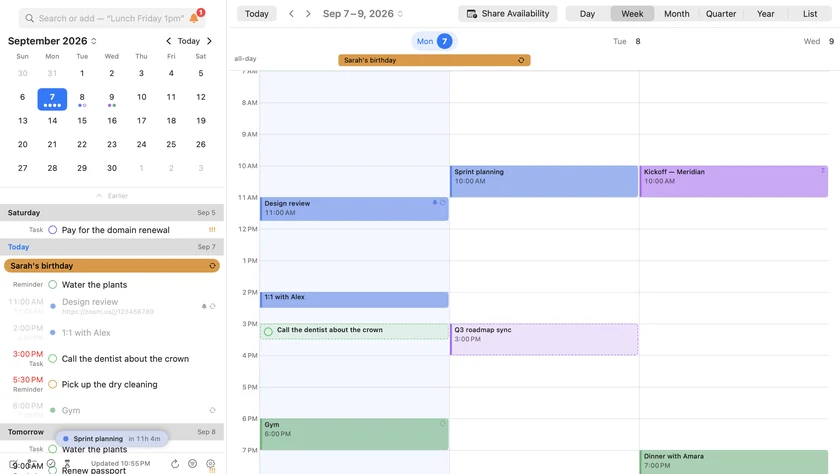
A plan and a deadline answer different questions. Choose when you want to work, then set a separate finish-by deadline. Moving the planned time keeps that deadline in place.
Timed tasks appear as blocks in Day and Week, beside your meetings. Drag a task onto the time grid, or use Schedule in Free Time to find a gap within your working hours. Auto-Schedule looks ahead through the coming week and respects each task's deadline. Add an alert separately when you want a notification.
Capture the thoughtMaciOS
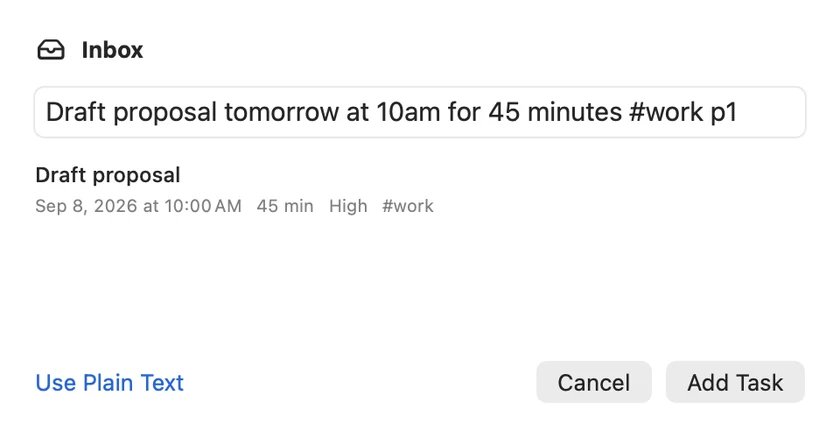
Type the task while it is still on your mind. Quick entry recognizes a date, time, duration, #tags and p1/p2/p3 priority on your device. The preview shows what will be saved; Use Plain Text keeps your words exactly as typed.
On Mac, File ▸ New Task opens the floating entry panel shown here. Assign an optional global New Task shortcut in Settings to open it while using another app. On iPhone and iPad, enter a task in the Tasks sheet and check its preview before adding it.
A quarter that looks backMaciOS
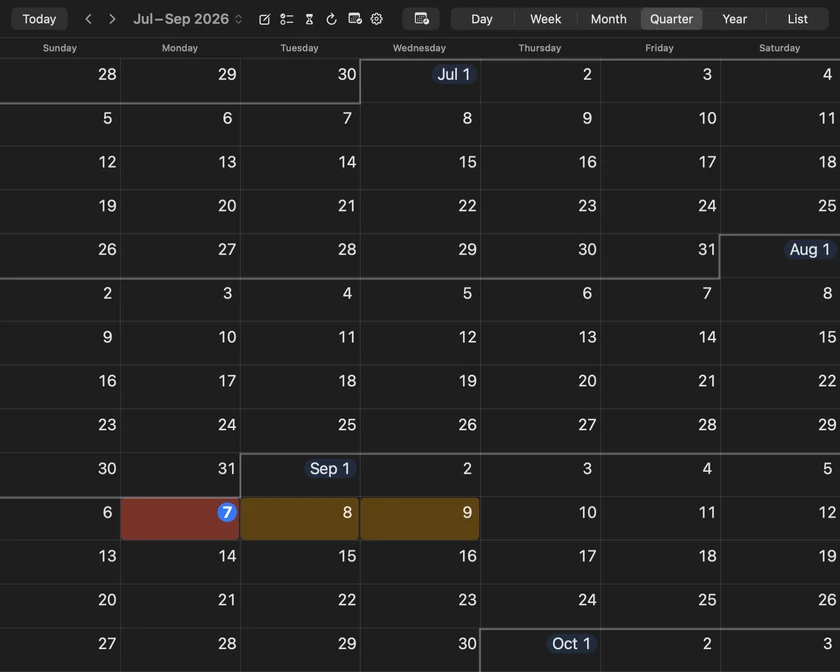
Put the current month where it helps you plan. Quarterly View now lets you choose First, Middle or Last. Choose Last and September sits at the end of July–September, so the two months behind you stay in view. Today and Go to Date restore that position, while the arrows still move through three months at a time.
On Mac, open Settings ▸ Appearance ▸ Quarterly View. On iPhone and iPad, open Settings ▸ Appearance ▸ Quarterly View. The choice syncs across your devices.
Heat maps, chosen per viewMaciOS
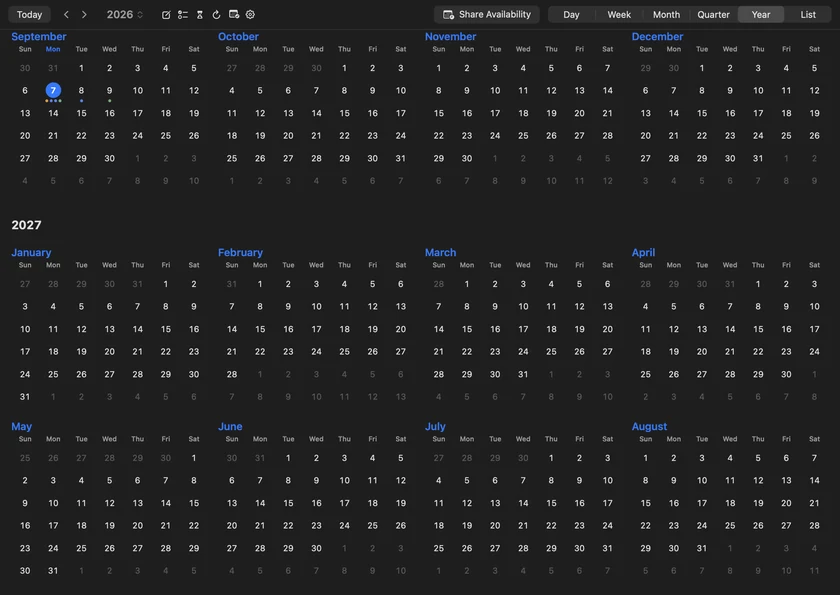
Year and Quarter keep separate heat-map choices. The Mac screenshots here use heat colors in Quarter and ordinary event markers in Year, with the same sample calendars. Choose whichever combination makes each view easier to read.
On Mac, View ▸ Heat Map gives Quarter and Year their own checkmarks, so you can switch either without opening Settings. You can also set each heat map in Appearance on Mac or Appearance on iPhone and iPad; those choices sync across your devices.
Plus 21 smaller changes — fixes, tidy-ups and one-line wins that didn't need a paragraph. See every line →
Everything in this release
- Ready for macOS 27: Siri understands your InstaCal events, tasks and reminders. Ask what's on your calendar, when you're free or what's next, then create or change an event just by asking, for one occurrence of a repeating event or every one that follows. The menu bar item and panel take on the new macOS 27 look.Mac
- New widgets: Agenda List shows your days as one continuous list, with day navigation, event paging and reminder completion right in the widget. On macOS 27, Days Ahead and Up Next + Calendar come in an extra-large portrait size, and Up Next can show your countdowns.Mac
- Siri and Shortcuts can add and complete tasks, hand your events to other Shortcuts actions, and find events, tasks, reminders, countdowns and Smart Filters in Spotlight.Mac
- Tasks: a task manager built into your calendar, with lists, tags, checklists and progress, kept separate from Apple Reminders. Capture a task in plain language, keep a finish-by deadline apart from the time you plan to work on it, and find room for it within your working hours.
- Connect Google Tasks, Microsoft To Do and Todoist, each synced directly beside your personal task library. Search, sort and filter tasks and reminders by date, priority or completion.
- Lock InstaCal behind Touch ID or your login password, with a lock-after delay; while locked, the menu bar shows only the date. Mark calendars private to keep them hidden until you show them with Touch ID, with quiet or detail-free alerts.Mac
- Give a countdown a photo, your own or one generated from a description (even with you in it), and see it as a full-size poster, in photo-row widgets, or as its own menu bar item.Mac
- See the year as a wall planner, twelve month rows under one weekday header, and put the current month first, middle or last in Quarter, with separate heat maps for each.Mac
- Choose up to two detail lines for events, tasks, reminders and countdowns, shown in lists and widgets and synced across your devices.
- Block on Calendar puts a private "Busy" copy of any event on another calendar, and Remove Blocking takes it back.
- Reorder accounts, calendars and reminder lists, and arrange the calendars inside a Calendar Set.
- Call a phone number from an event in the app you choose: FaceTime, WhatsApp, Google Voice or Zoom Phone. Export events to CSV, and import any .ics file by double-clicking it, even one containing broken events.Mac
- Give Calendar, Reminders and Tasks their own menu bar items, choose whether + creates an event, a reminder or a task, and ignore a repeating invitation series without replying.Mac
- Ready for iOS 27: Siri understands your InstaCal events, tasks and reminders. Ask what's on your calendar, when you're free or what's next, then create or change an event just by asking, for one occurrence of a repeating event or every one that follows.iOS
- New widgets: Agenda List shows your days as one continuous list, with day navigation, event paging and reminder completion right on your Home Screen. On iOS 27, Days Ahead and Up Next + Calendar add an extra-large portrait size where your device offers it, XL agendas fill spare room with the days ahead, and Up Next can show your countdowns.iOS
- Say "Remind me in InstaCal" to capture a reminder in plain language. Siri and Shortcuts can also add and complete tasks, hand your events to other Shortcuts actions, and find events, tasks, reminders, countdowns and Smart Filters in Search.iOS
- Lock InstaCal behind Face ID or Touch ID, with your passcode as the fallback and a lock-after delay; the app switcher shows a cover, not your events. Mark calendars private to keep them hidden until you show them with Face ID, with quiet or detail-free alerts.iOS
- Give a countdown a photo, your own or one generated from a description (even with you in it). Tap it for a full-screen poster that counts down to the second, and see it in photo-row widgets.iOS
- See the year as a wall planner, twelve month rows under one weekday header (turn the phone sideways for the whole year), and put the current month first, middle or last in Quarter, with separate heat maps for each.iOS
- Call a phone number from an event in the app you choose: Phone, FaceTime Audio, WhatsApp, Google Voice or Zoom Phone. Export events to CSV, and open any .ics file from Mail or Files, even one containing broken events.iOS
- A Date complication on Apple Watch shows the weekday and day and opens InstaCal with a tap. Choose whether + creates an event, a reminder or a task, and ignore a repeating invitation series without replying.iOS
