InstaCal in short
- What it is
- A calendar that lives in the macOS menu bar. Click the date or press a global hotkey and the month, your agenda, reminders and invitations appear in one panel.
- Calendars
- Works across Apple, Google and Microsoft 365 — plus iCloud, Fastmail, Yahoo, Fruux and any other CalDAV server, signed in inside InstaCal rather than in System Settings.
- Adding an account
- iCloud, Fastmail, Yahoo and Fruux arrive with their server address already filled in and a link to the page where that provider issues an app-specific password; anything else standards-based goes in under CalDAV. A webcal, .ics or HTTPS feed subscribes with an optional password and a re-check interval you choose.
- Adding events
- Type in plain English — "Lunch with Sam Friday 1pm" — and press Return. A live preview shows what will be created before you commit.
- Meetings
- The next event and a live countdown can sit in the menu bar, with a Join button that stays available until the call ends.
- Price
- $19.99 once on the App Store, down from $29.99. One purchase includes InstaCal for Mac, iPhone, iPad and Apple Watch; it is not a subscription.
- Requirements
- macOS 15 Sequoia or later, on Apple silicon or Intel.
- Privacy
- No analytics, no tracking, no server of ours. Tokens stay in your Keychain.
Everything you actually open a calendar for.
One panel, arranged so the common questions answer themselves.
A month you can scan
The month grid sits at the top with today marked, week numbers optional, and arrow keys to move a day or a week at a time.
An agenda that keeps going
Keep scrolling up to 400 days ahead or back through 24 months of history, with earlier days one pull away.
Reminders in the day they're due
Apple Reminders — and Todoist tasks, if you connect it — sit in the flow of the day with their priority marks. Click the circle to complete one without leaving the panel.
Accounts added here, not in System Settings
iCloud, Fastmail, Yahoo and Fruux come with their server address filled in and a link to where the provider issues an app password. Any other CalDAV server, and any webcal or .ics feed, goes in the same sheet.
Invitations you can answer here
InstaCal flags schedule conflicts on invitations. Direct Google and Microsoft accounts can accept, decline or reply tentative — with a comment or silently; Apple invitations open in Calendar.
Weather in the day header
Conditions, high and low sit in each day's header, from Apple Weather or The Weather Company — or switch it off entirely.
Calendar Sets
Name a group of calendars and switch the whole panel in one click. "Work" hides the family noise; "Personal" hides the standups.
One panel, the whole day.
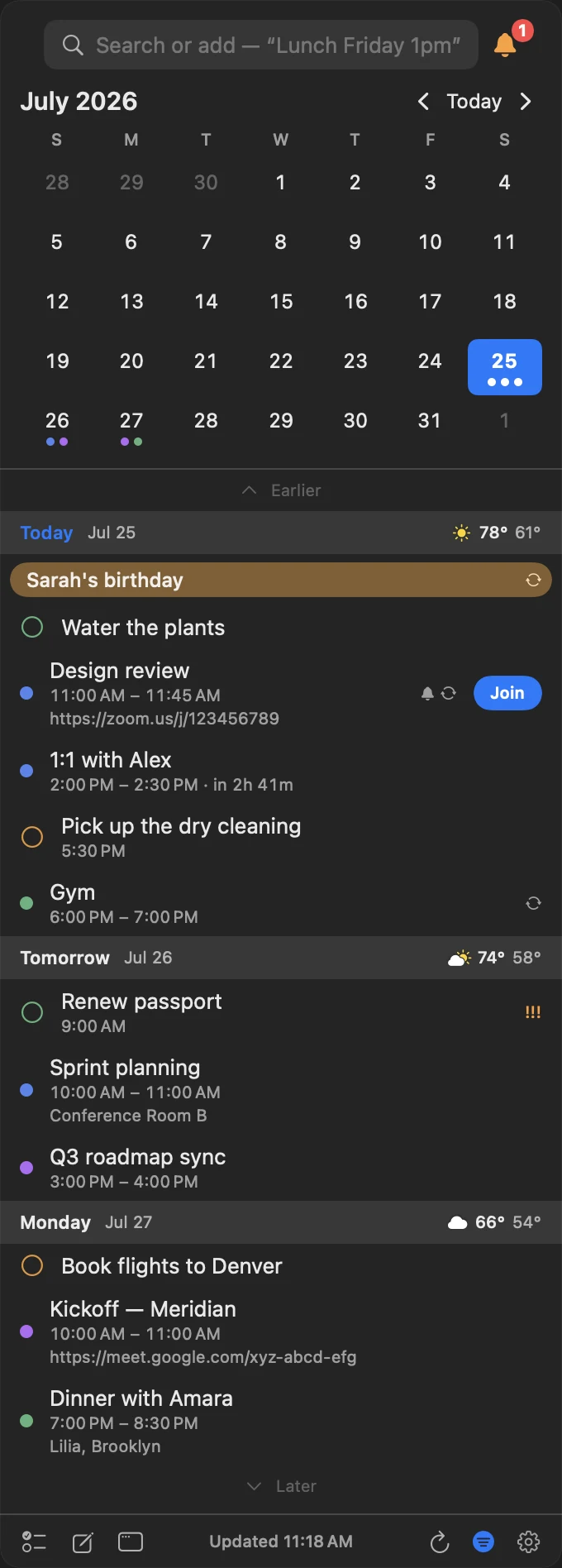
Month, agenda, reminders and weather in one glance.
Everything you open a calendar to check, in the order you check it. The month grid for orientation, then a day at a time with the times, the meeting links, the reminders that are due, and the forecast for the day you're looking at.
- A live countdown on the next event — “in 33m”, not mental arithmetic
- Meeting links surfaced from wherever the organiser hid them
- Due reminders in the flow of the day, completed with a click
- Conditions, high and low in each day header

Your reminders, in the same keystroke.
Switch the panel to reminders and they're all there with their due dates, priority marks and lists. Click a circle to complete one; it syncs straight back to Apple Reminders.
- Due dates and times, with priority marks
- Complete without leaving the panel
- Separate lists, each with its own colour
- Location-based geofence alerts in the editor
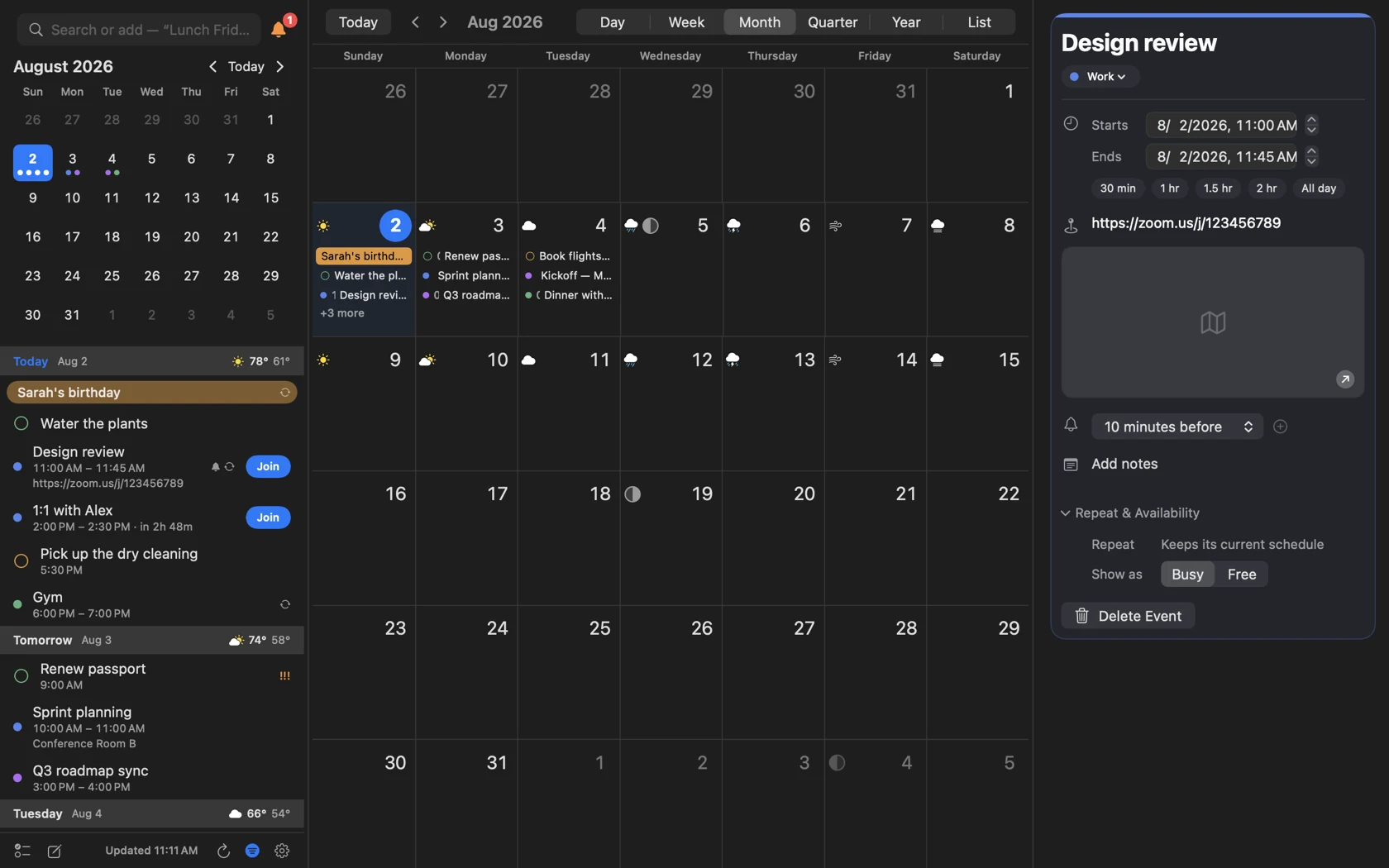
When you need a proper month, it's a keystroke away.
The menu bar is for the ten-second question. For planning, InstaCal opens a real calendar window with Day, Week, Month, Quarter, Year and List views, search, and an inspector that edits an event in place.
- Month runs on as one grid of weeks; Quarter is thirteen; Year is month rows four across
- The sidebar is a mode — agenda, months, calendars, both, or nothing at all
- Edit times, alerts, repeat and availability in the inspector
- About six years of events are mirrored locally, so any month opens instantly
Three minutes from install to useful.
- Install and grant calendar accessInstaCal reads the calendars already in your Mac's Calendar app, so if your accounts are set up in macOS there is nothing else to connect.
- Or add the account hereiCloud, Fastmail, Yahoo and Fruux arrive with their server address filled in and a link to where that provider issues an app-specific password; Google and Microsoft sign in through your browser; anything else standards-based goes in under CalDAV. No trip to System Settings.
- Pick your hotkeySet a global shortcut to open the panel. When it closes, focus returns exactly where it was. Every menu command and calendar view can take a shortcut key you choose.
- Decide what the menu bar showsTen date styles or a custom pattern, plus the optional next event and countdown.
What InstaCal does with your data
- Analytics
- None. InstaCal contains no analytics SDK and no tracking of any kind.
- Your accounts
- Google, Microsoft and Zoom tokens and the app-specific passwords for direct iCloud, Fastmail, Yahoo, Fruux and CalDAV accounts are stored in Apple's Keychain.
- Where events go
- Directly between your device and your calendar provider. There is no server of ours in between.
- Sandboxing
- InstaCal is sandboxed, as required by the App Store.
Questions about InstaCal
What is a menu bar calendar?
Which calendars does InstaCal work with?
Does InstaCal replace Apple's Calendar app?
Can I still see a full calendar window?
What does InstaCal require?
Does InstaCal collect any data?
How much does InstaCal cost?

Put your calendar where you already look.
One keystroke to the whole schedule, then out of your way.
$29.99 $19.99 once. One purchase includes InstaCal for Mac, iPhone, iPad and Apple Watch. No subscription, InstaCal account or ads.
More from InstaCal
Plain-English event entry
Type "Lunch with Sam Friday 1pm" and press Return. A live preview shows what you'll get.
Next meeting in the menu bar
Your next event and a live countdown where you already look, with a one-click Join.
A Fantastical alternative
The menu bar panel, plain-English entry and Calendar Sets — for one payment instead of a subscription.