Plain-English entry, in short
- What you type
- A sentence: "Dinner with Amara Friday 7pm at Lilia". InstaCal reads the title, day, time and location out of it.
- Repeats
- Say it and you get the series: “Run payroll every Monday at 9am” becomes a weekly event, with the repeat phrase taken out of the title. Daily, weekly, every other week, monthly and yearly, in every language InstaCal speaks.
- Languages
- Type the sentence in your own language. Quick Add reads dates, times and repeats in all 31 languages InstaCal speaks — Polish “w południe”, Hindi “कल”, Indonesian “pukul 3 sore”. Searching and the Quick Edit commands are English.
- What you see
- A live preview of the event that will be created — date, time, calendar and type — updating as you type, so nothing is a surprise.
- Search or add
- The same box does both. A few letters searches your existing events; a sentence creates a new one. InstaCal decides which you meant.
- Quick Edit
- In English, commands such as "move gym to Friday", "cancel dinner Friday" and "rename standup" preview the exact change before you commit.
- Reminders too
- Phrase it as "remind me to…" and it's filed as a reminder instead of an event.
- Where parsing happens
- On macOS 26, Apple Intelligence parses what you type on-device. On earlier versions InstaCal uses its own built-in parser. Nothing you type leaves your Mac either way.
- Calendar choice
- Name a calendar explicitly or use the starred default. On supported Macs, Apple Intelligence can also infer one from the entry's context.
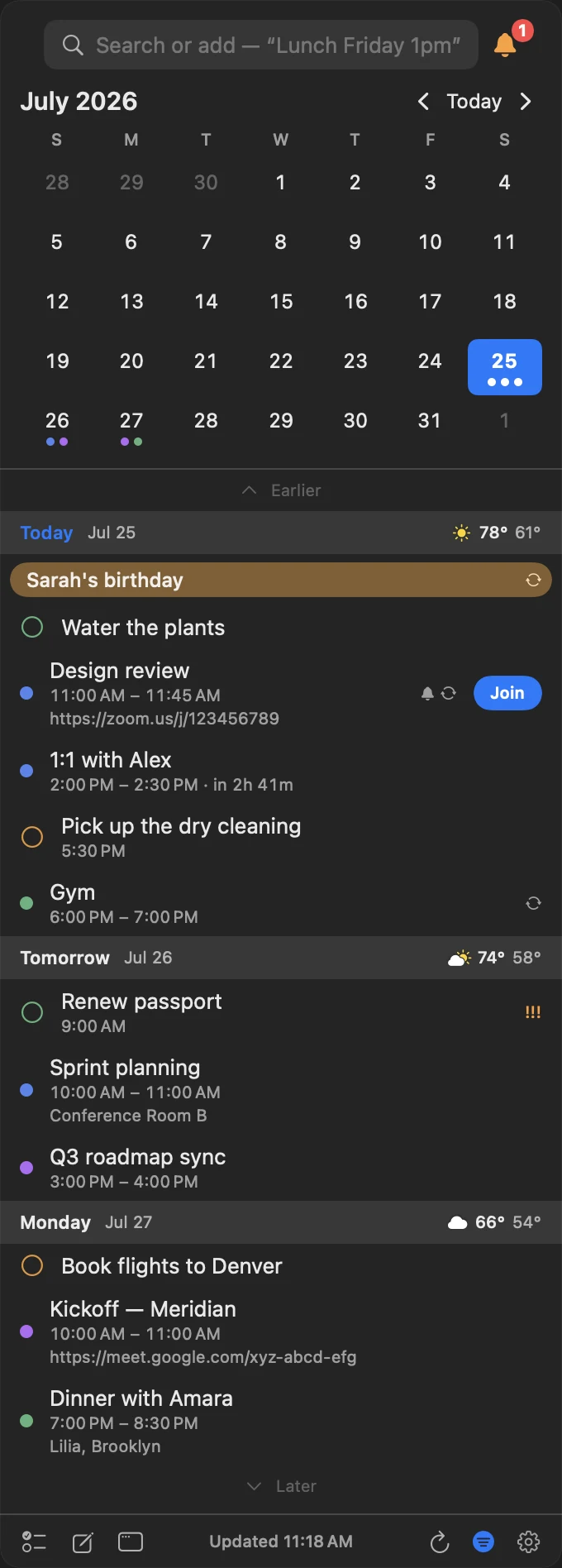
The box is the first thing the panel gives you.
It opens armed and focused, so the whole interaction is: hotkey, type the sentence, Return. The same field filters your existing events when what you type looks like a search instead.
- Armed on open — no click needed before typing
- Search and create share one field
- A live preview builds as you type
- Return commits; Esc leaves nothing behind
It reads the sentence the way you meant it.
It knows "dinner" is evening
Common words carry times. "Dinner Friday" lands in the evening, not at 9 a.m., without you spelling out the hour.
It sentence-cases the title
What you type fast becomes a title that looks deliberate, so you're not editing capitalisation after the fact.
It picks the right calendar
Name a calendar or use your starred default. On supported Macs, Apple Intelligence can also infer one from the entry's context.
It tells events from reminders
"Remind me to send the invoice Monday" becomes a reminder with a due date. "Kickoff Monday 10am" becomes an event.
It finds locations
Location autocomplete comes from Maps, so a place name becomes a real address you can get directions to.
It stays on your Mac
On macOS 26 Apple Intelligence does the parsing on-device; earlier versions use InstaCal's own parser. Neither sends what you type anywhere.
Common questions
How does InstaCal know whether I'm searching or adding?
Does natural-language parsing send my text to a server?
What kinds of phrases does it understand?
Can I correct what it guessed?
Can it make a repeating event?
Does Quick Add work in languages other than English?
Can I change an existing event from the same box?
How much does InstaCal cost?

Stop filling in calendar forms.
Type the sentence, press Return, get back to work.
$29.99 $19.99 once. One purchase includes InstaCal for Mac, iPhone, iPad and Apple Watch. No subscription, InstaCal account or ads.
More from InstaCal
Mac menu bar calendar
Month view, long-range agenda, reminders and invitations in one panel that opens with a keystroke.
A Fantastical alternative
The menu bar panel, plain-English entry and Calendar Sets — for one payment instead of a subscription.
Next meeting in the menu bar
Your next event and a live countdown where you already look, with a one-click Join.