A Month widget that names your events.
The Large Month widget lists every day's events by title and opens any day right on the Home Screen. Plus Reminder Badge on iPhone and iPad, and repeats on any schedule: every 3 months, every other day, or every Tuesday and Thursday.
The month, with every event namedMaciOS
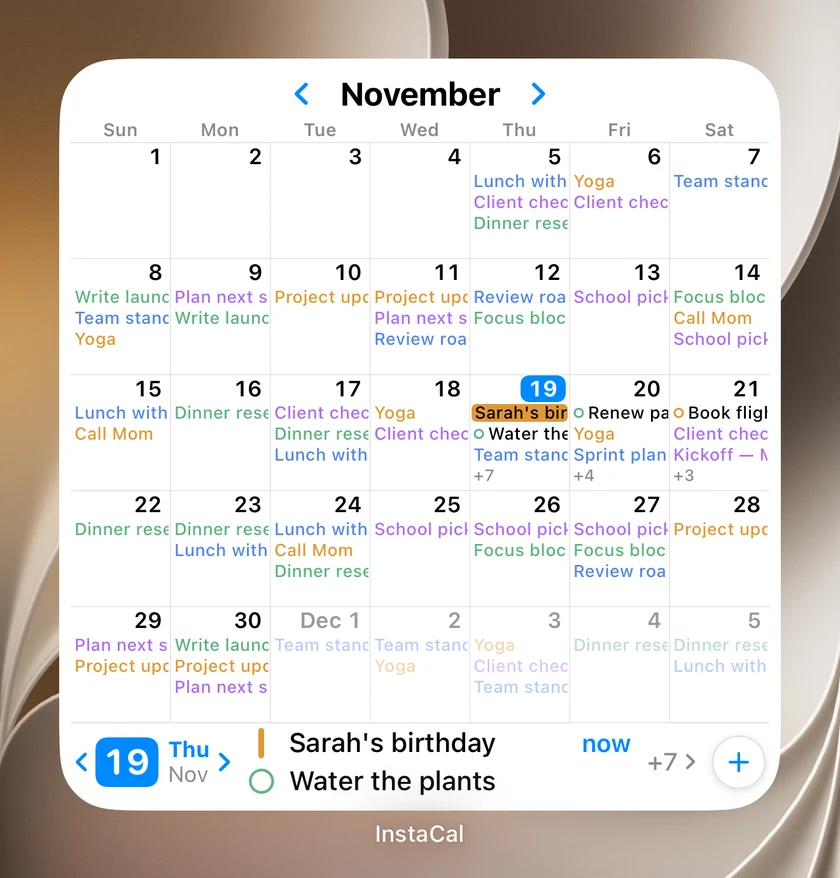
The Large Month widget now reads like the app's Month view. Each day lists its events by title in their calendar's color, a trip or a conference runs as a bar across the days it covers, and a busy day ends in a count of what did not fit. On iPad and Mac the Extra Large size shows two months side by side.
Tap a day and its events appear in a strip along the bottom, without leaving the Home Screen. Step from day to day with the arrows, check off a reminder, join a call or get directions, or add an event with the + button. Tap the same day again to open it in InstaCal.
Edit Widget has three new choices: Month Shows trims the grid to work days, Start with Current Week puts this week on the top row, and Agenda hides the strip for a grid that fills the widget. In the Small and Medium sizes, a tap on a day shows that day's events in place.
Plus 18 smaller changes — fixes, tidy-ups and one-line wins that didn't need a paragraph. See every line →
Everything in this release
- The Month widget shows your events by name: the Large and Extra Large sizes list each day's events with multi-day events as bars across the week. Click a day to see its events along the bottom, check off a reminder, join a call or get directions without opening the app.Mac
- Make the Month widget yours in Edit Widget: show work days only, start at the current week, hide the strip, or rest on last, this or next month so three side by side show three months at once. In Small and Medium, click a day to see its events in place.Mac
- Repeat on any schedule: every 3 months, every other day, quarterly, every weekday, or every Tuesday and Thursday. Type it into Quick Add, or choose Custom… in any Repeat menu to set the days, the place in the month and when it ends.
- Make a new Google, Microsoft or iCloud calendar right from its account in Settings, and share the Google calendars you own, or your main Outlook calendar, with anyone by email.Mac
- Quick Add stops guessing a place from words that only describe one. "Walk in the park" or "dinner at home" stays in the title, and Location offers it with one click instead of pinning a park of its own choosing.Mac
- Apple Intelligence in Quick Add is more careful with repeats, places and titles, and its sparkles open a menu to undo it or turn it off.Mac
- The Month view lists unfinished reminders from earlier days under today when "Show overdue under today" is on, and Tasks and reminders can list items with no date first when sorted by Date.Mac
- Widget settings appear in your language, and addresses written in any script get the map and directions.Mac
- Repeating events on CalDAV accounts offer Delete All Future Events, right-click a countdown to edit, feature or delete it, and InstaCal stays quick however many repeating tasks you have completed.Mac
- The Month widget shows your events by name: the Large size, and Extra Large on iPad, list each day's events with multi-day events as bars across the week. Tap a day to see its events along the bottom, check off a reminder, join a call or get directions without opening the app.iOS
- Make the Month widget yours in Edit Widget: show work days only, start at the current week, hide the strip, or rest on last, this or next month so three side by side show three months at once. In Small and Medium, tap a day to see its events in place.iOS
- Reminder Badge puts your overdue reminders and the ones due today on the app icon. Turn it on in Settings > Notifications > Reminders.iOS
- Make a new Google, Microsoft or iCloud calendar from its account in Settings, and share the Google calendars you own, or your main Outlook calendar, with anyone by email.iOS
- Quick Add stops guessing a place from words that only describe one. "Walk in the park" or "dinner at home" stays in the title, and Location offers it with one tap instead of pinning a park of its own choosing.iOS
- Apple Intelligence fills in the new event and reminder forms too, more carefully, and its sparkles open a menu to undo it or turn it off.iOS
- Month view lists unfinished reminders from earlier days under today when Show Overdue Under Today is on, and Tasks and reminders can list items with no date first when sorted by Date.iOS
- Widget settings appear in your language, and addresses written in any script get the map card and directions.iOS
- Repeating events on CalDAV accounts offer Delete All Future Events, touch and hold a countdown to edit, feature or delete it, and syncing is steadier when you leave the app mid-refresh.iOS
