Adaptive panes
InstaCal uses the width available rather than stretching the iPhone layout. A wide iPad can show the agenda, active calendar view and selected event inspector together. In narrower Split View sizes, panes collapse into navigation that keeps the same content reachable.
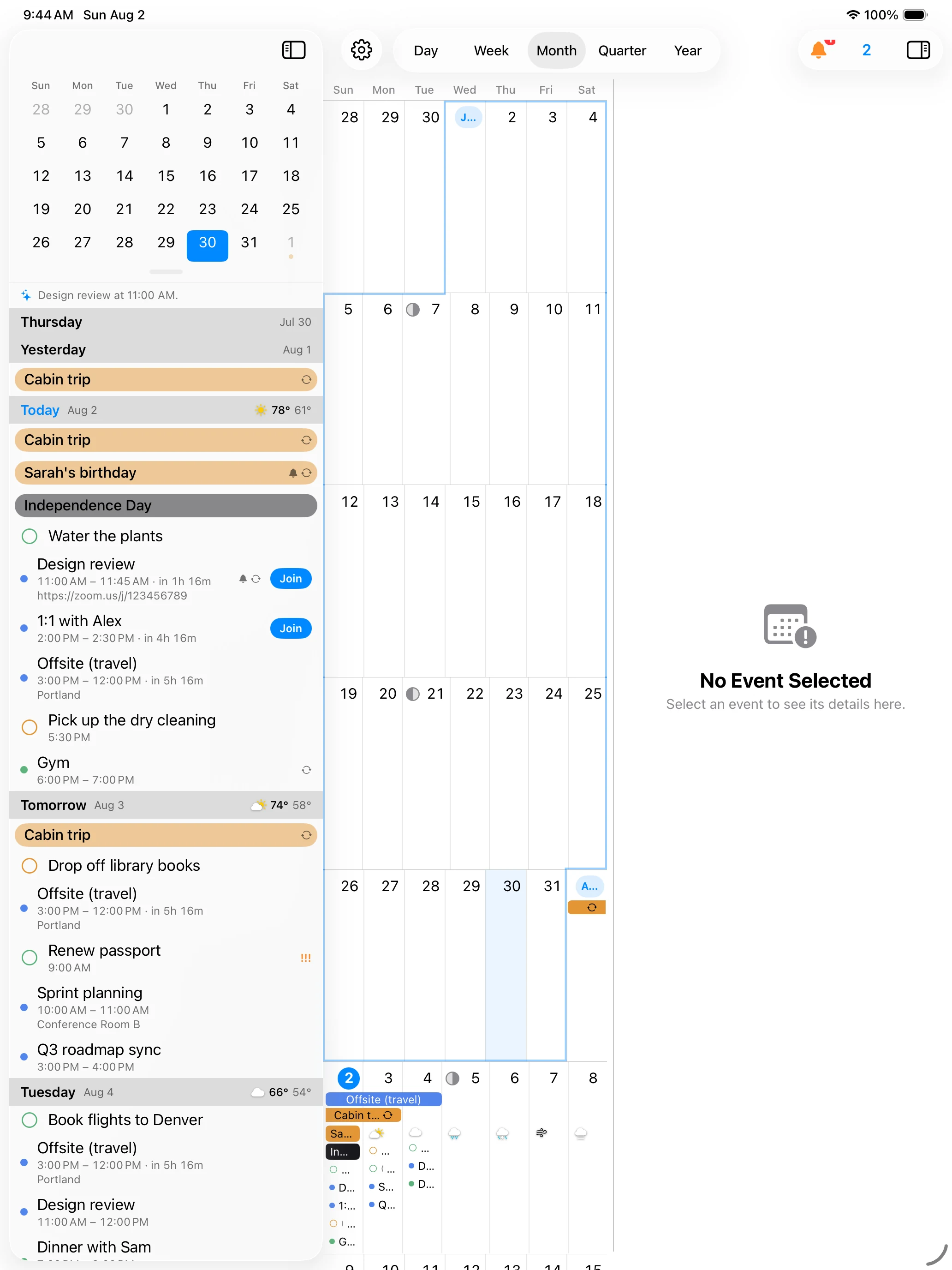
Work across the panes
Select a day or event in the agenda to update the calendar and inspector. Select an event in the calendar to inspect it without losing the surrounding schedule. Edit supported fields in the inspector or open the full editor for every option.
The sidebar and inspector can be shown or hidden when you want more space for Day, Week or Month.
The toolbars
The iPad has the whole of the iPhone’s toolkit, split between the two columns.
The calendar pane’s toolbar holds Filters on the left — the calendar picker, which fills in when calendars are hidden or a Smart Filter is running — and Search beside it. On the right sit Settings and Add: a menu offering Add Event and Add Reminder.
The sidebar’s toolbar holds its own Search, a Reminders toggle that flips the column to the reminders list, and Countdowns while one is running. Above the mini calendar is the shared quick-add field — Search or add — “Lunch Friday 1pm” — which both finds existing events and creates new ones from a typed phrase.
In the Day and Week grids, a long press on an empty hour offers New Event, which opens the full editor at that time.
Sheets and details
Settings → Display → Appearance → Event Details chooses how a selected event appears: Side panel, the default, keeps it beside the calendar, and Popup opens it as a sheet instead. In Popup, tapping a Week tile or an all-day bar opens the full details as a full-height sheet.
Settings → Display → Gestures & Navigation → Tapping a Year Day can be set to Show list, which opens that day’s events as a half-height sheet with the day named at the top; picking a row opens that event’s details. A reminder chip in the Month grid opens its editor as a sheet too.
Multitasking and orientation
InstaCal responds to Stage Manager, Split View and rotation. Week expands from a rolling portrait layout toward a full week when space permits. The calendar retains the selected date and view while the window size changes.
Week and Day page under a swipe rather than scrolling continuously, and Quarter draws its months as cards that survive a rotation.
Keyboard and pointer
Hardware keyboards and trackpads use standard iPad interactions. Arrow and command-key behaviors appear where the current focus and view support them, while drag and resize remain available with touch or pointer.
The menu bar’s View menu switches views from the keyboard: Command-1 Day, Command-2 Week, Command-3 Month, Command-4 Quarter, Command-5 Year and Command-6 Agenda, with Command-7 for Week on Week once it is turned on. The same menu holds Smart Filters, one row per saved filter, Clear Smart Filter, and Refresh at Command-R.
Tip: If the interface feels crowded in a narrow window, hide the inspector first. The selected event remains available when you open details again.
