Open and close the panel
Click InstaCal’s menu bar item, or press the shortcut set under Settings → Shortcuts → Global Shortcuts. Press Escape, click outside the panel or use the shortcut again to close it. Focus returns to the app you were using.
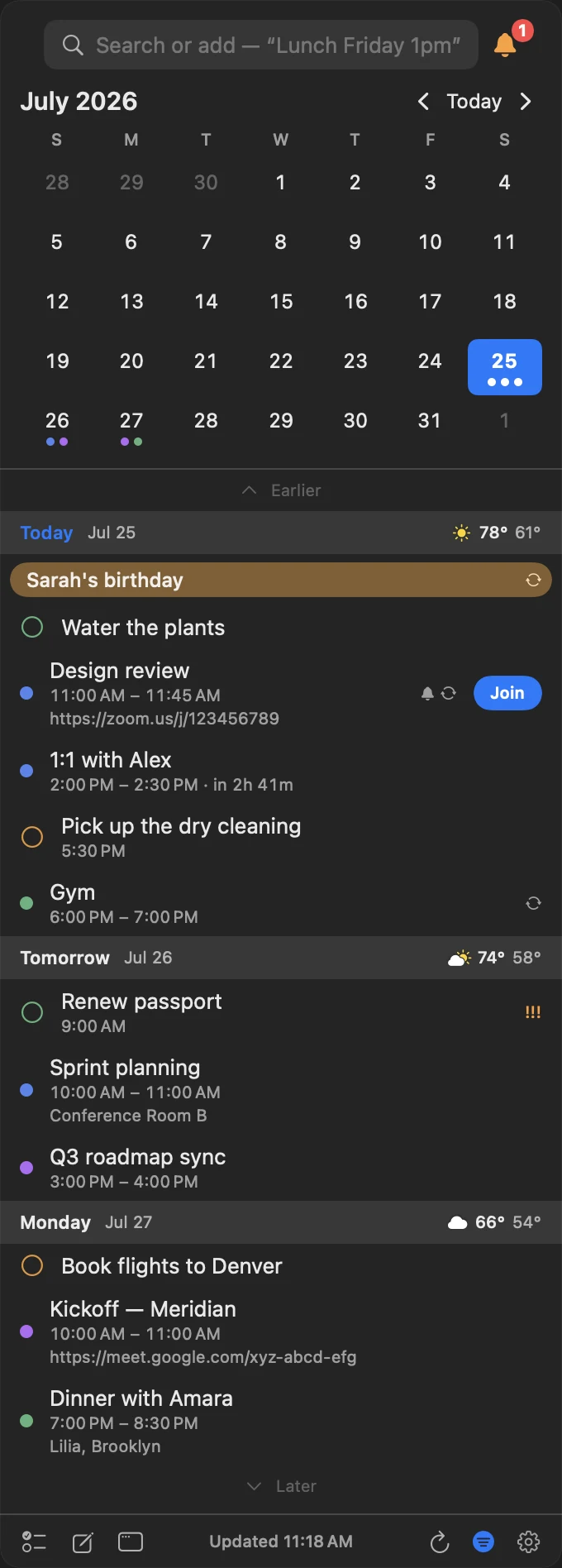
Read the month and agenda
The month grid shows calendar-color indicators and highlights the selected date. Select a day to move the agenda there. Use the arrows beside Today, the arrow keys, or trackpad scrolling to move through dates.
The agenda continues beyond the selected day and can include timed events, all-day and multi-day events, reminders and invitations. Weather and moon details can appear in each day header when enabled.
Act without opening another app
Select an item for details. Available actions can include Edit, Duplicate, Convert to Reminder, Reschedule, Move Calendar, Busy or Free, Join, Get Directions, Share and Delete. Complete a reminder by selecting its circle.
Meeting links found in the URL, location or notes appear as a Join button and remain available until the event ends.
Arrange the toolbar
The panel’s footer buttons are yours to order. Open Settings → Appearance and find Toolbar in the Panel section: drag any button onto a dashed spot to reorder it, across the gap to move it to the other side, or onto the hidden shelf to take it off the bar. Reset restores the standard order. The middle of the bar shows when the calendar last updated.
Two buttons follow their own rules: Countdowns is shown only while a countdown is running, and Open calendar window is not shown inside the calendar window itself.
Up Next bubble
Turn on Settings → Appearance → Up Next Bubble to seat a row above the footer naming your next event, its calendar and how long you have. It is the same bubble the iPhone floats over its view bar.
When a permission is missing
If InstaCal cannot see your reminders, the reminders list says Reminders Access Needed rather than showing an empty list, with a Set Up… button that raises the system permission sheet, or Open System Settings when the grant was refused earlier. The agenda shows Calendar Access Needed the same way — including the case where InstaCal may add events but not read your calendar, where Allow Full Access asks in place.
Both grants are re-read every time the panel opens and on every refresh, so a permission changed in System Settings takes effect without relaunching InstaCal. See Common Questions and Fixes.
If the menu bar item is hidden
Relaunching InstaCal while macOS or a menu bar manager is hiding its item opens the panel with a banner explaining why, and a button that opens the manager or Settings → Menu Bar. The panel opens at the top right of the screen rather than off screen beside the missing item, and the banner goes when the panel closes. Menu Bar Date, Next Item and Countdown covers the notice itself.
Resize or detach
Drag the panel edges to choose the width and height; InstaCal remembers them. A new install opens the panel at 748 pt tall, and Settings → Appearance → Panel → Panel height offers Compact, Standard, Tall and Extra Tall as one-click sizes. Use the window control in the footer when you want the panel to stay open as a regular floating window.
Tip: Open Settings → Appearance while the panel is visible. Theme, colors, height and agenda changes update in the live panel preview.
