Open the editor
Create an event from Quick Add, double-click a calendar time, or choose Edit from an event’s action menu. Select a reminder and choose Edit to open the reminder editor.
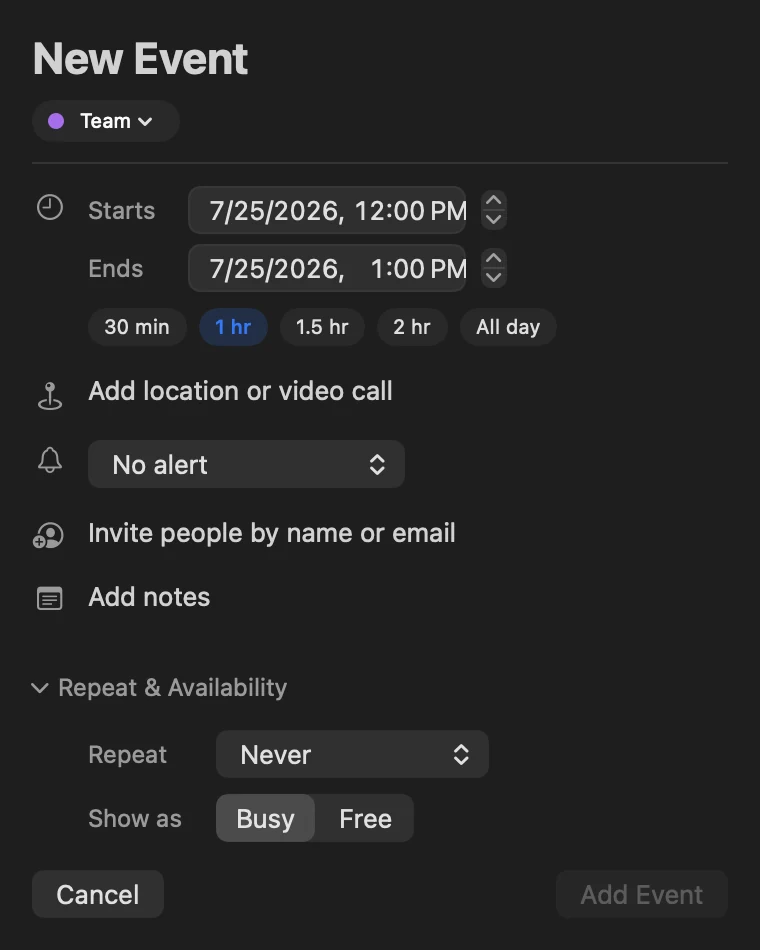
Event fields
Choose the title, calendar, start and end, time zone and all-day state. Duration chips cover 30 minutes, 1 hour, 1.5 hours, 2 hours and All Day. Add a Maps-backed location, URL, notes, repeat rule, Busy or Free availability and multiple alerts.
Direct Google and Microsoft calendars can preserve provider details including event colors or categories, privacy, guest permissions and attendee roles. Supported events can carry file and photo attachments; details let you view, download, share or remove them.
Invite people
Add attendees by name or email. Contacts access enables suggestions. Direct Google and Microsoft accounts send and update invitations through the provider. See Invitations and RSVP for replies and conflict checks.
Choosing whether guests are emailed
Before a change to a Google event reaches the people invited to it, InstaCal asks. A short prompt names the event and how many guests it has — Send invitation emails? for a new invitation, Send update emails? for an edit, a reschedule or a move to another calendar, Send cancellation emails? for a delete — and offers Send or Don’t Send. It is the same choice Google Calendar offers on the web.
The question is asked once per change, and only for Google events with guests other than you. Microsoft and Apple calendars follow their own providers’ behavior and do not ask. Changes made on Apple Watch or through Shortcuts always send, because there is nobody at the keyboard to answer.
What a provider will not let you change
Some events on a Google calendar are made by Google rather than by you, and Google limits what may be edited. InstaCal saves the fields that are allowed and explains the rest instead of failing silently — a birthday takes a new title, color, alerts and date; an event Google built from a Gmail message takes color, alerts, privacy, busy or free, and guests; focus time and out-of-office events stay marked Busy. None of them are offered Move Calendar. Common Questions and Fixes covers what to do about it.
Read an event you did not write
An event you have been invited to but not yet answered, and a Google event marked tentative, are drawn with a dashed edge; the detail view labels a tentative event Tentative above its title. Notes written as HTML by a provider are shown as readable plain text, with any links spelled out.
When a meeting carries more than a link, the conference card shows the rest of it.
Reminder fields
Choose the Reminders list, title, due date and time, priority, notes and alert. Location reminders can trigger when arriving at or leaving a place. A reminder can appear in the agenda, widgets, menu bar and Alarms window according to your settings.
Tasks from a connected Todoist account sit in the same lists and use the same editor: add, reschedule, complete and reopen them, with Todoist’s three priorities mapped to High, Medium and Low. A recurring Todoist task keeps its due date locked here, because InstaCal cannot express Todoist’s full rule — change that in Todoist.
If InstaCal cannot see your reminders at all, the list says Reminders Access Needed with a button that asks for access or points at System Settings, rather than looking like an empty day.
Edit a repeating event
Changing one occurrence of a repeating event raises the question every calendar has to ask: this event only, or this one and everything after it. InstaCal asks it on Google and Microsoft 365 calendars as well as Apple ones, and asks it the same way wherever the change starts.
Save an edit to an occurrence and InstaCal says This is a repeating event, then offers This Event Only or All Future. The same pair appears when you delete an occurrence (This Event or All Future Events), and when you drag one to a new time in the Day or Week grid (Move This Event Only or Move All Future Events).
On Apple calendars the change is handed to the system, which understands series directly. On a direct Google or Microsoft calendar, All Future ends the original series just before the occurrence you edited and recreates the remainder carrying your change. The result is what you asked for; the series is stored as two runs rather than one.
Guests are told. An edit that goes out through Google or Microsoft reaches the attendees the same way a change made in the provider's own web calendar would — on a Google event, after InstaCal has asked whether to email them.
Note: the choice is offered only when InstaCal can honour it. An older cached occurrence that has lost track of which series it belongs to is edited and deleted as a single occurrence rather than being offered a choice it could not keep.
Replying to an invitation for a repeating event answers for the whole series. See Invitations and RSVP.
Duplicate, move or convert
The action menu can duplicate an item, move it to another calendar, convert a supported event into a reminder, reschedule it or mark it Busy or Free. Deleting asks for confirmation when the action cannot be undone locally.
