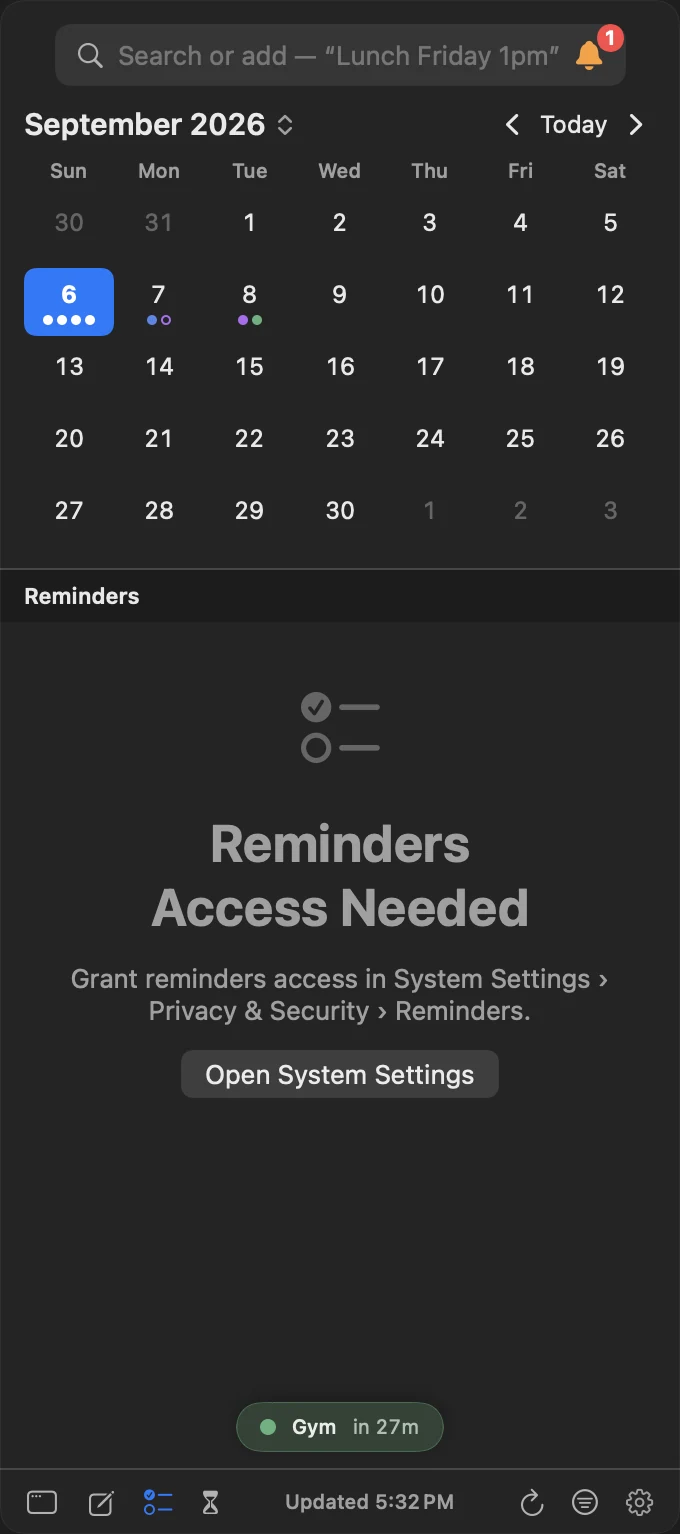
InstaCal says Calendar Access Needed or Reminders Access Needed
The list is not empty — InstaCal cannot see it. The notice carries the one button that fixes it:
- Set Up… means InstaCal has never been asked on this machine or account. It raises the system permission sheet right there.
- Allow Full Access means InstaCal has add events only access: it may create events but cannot read a single one. macOS and iOS treat that as a third answer, not a refusal, so the sheet can be raised again in place.
- Open System Settings (Mac) or Open iOS Settings… (iPhone and iPad) means access was refused earlier and only the system can grant it. Go to System Settings → Privacy & Security → Calendars or Reminders, or Settings → Apps → InstaCal → Calendars or Reminders.
Both grants are re-read every time the Mac panel opens and on every refresh, so a permission you change takes effect without relaunching InstaCal. The same Allow Full Access… button is on the Apple calendars row under Settings → Accounts.
Why is a calendar missing?
Open Settings → Accounts and confirm Calendar access is Granted or the direct account is Connected. Then open Settings → Calendars and make sure the calendar and its current Calendar Set are enabled. On Apple-managed accounts, also confirm the calendar appears in Apple Calendar.
Why are events duplicated?
The same Google or Microsoft account may be visible both through Apple Calendar and a direct InstaCal connection. Open Settings → Calendars, compare provider labels and hide one route. InstaCal de-duplicates clear matches but cannot merge items whose sources identify them differently.
Why is a direct account stale?
Offline means cached events remain visible while the network is unavailable. Sign-in Needed means the saved authorization must be renewed. Open Settings → Accounts, select the account and reconnect before removing it.
Why am I getting two alerts?
InstaCal can deliver alerts stored on events and reminders. If Apple Calendar or Reminders announces the same alert, choose which app should notify you and turn off the duplicate app’s notification category in system Settings. Also check InstaCal’s fallback alert for items with no saved alert.
Why is the widget out of date?
Open InstaCal so it can refresh the shared widget snapshot. Confirm calendar permission and the widget’s chosen Calendar Set. Remove and add the widget again only after the app itself shows current data.
Why did the Live Activity not start?
Allow Notifications and Live Activities for InstaCal, enable the next-event or travel countdown in Settings and confirm an eligible timed event is approaching. System power and activity limits can reduce updates.
Why is Apple Watch showing old data?
Open InstaCal on the paired iPhone, then open the Watch app with Bluetooth or network connectivity available. If the app is missing, install it from the iPhone Watch app and confirm watchOS 11 or later.
The Mac menu bar item disappeared
InstaCal is almost certainly still running — macOS drops menu bar items it cannot fit, without telling anybody, and a menu bar manager can park one out of sight.
Launch InstaCal from Applications, Spotlight or the Dock. If its item is hidden, the panel opens at the top right of the screen with a banner saying which of three things happened, and a button that fixes it. Settings → Menu Bar carries the same notice, headed Your Menu Bar Item Is Hidden:
- Past the camera housing. macOS hides items that do not fit to the right of a Mac’s notch. Shorten the date style, cut the next-event text, or show the icon alone.
- The menu bar is full. Same remedies, plus removing other apps’ items.
- A manager has it hidden. InstaCal names the one it found — Ice, Bartender, Hidden Bar or Vanilla — and offers to open it so you can move InstaCal to its always-visible section.
The notice re-checks itself every couple of seconds, so it disappears as you shorten the text or unhide the item. If there is no notice at all, InstaCal’s item really is on the menu bar; check that Settings → General’s app mode includes it, and enable Launch at Login if it should come back after a restart.
I denied a permission
Open System Settings → Privacy & Security on Mac or Settings → Apps → InstaCal on iPhone and iPad. Enable the required permission, return to InstaCal and let it refresh.
Why can’t I edit this Google event?
Some events on a Google calendar are created by Google rather than by you, and Google limits what may be changed. InstaCal saves what is allowed and says what is not:
- A birthday takes a new title, color, alerts and date.
- An event Google built from a Gmail message — a flight, a hotel, a delivery — takes color, alerts, privacy, busy or free, and guests.
- Focus time and out-of-office events stay marked Busy.
- A locked copy of an event keeps its title, notes, location, time and repeat rule.
None of these are offered Move Calendar, and a series Google created automatically cannot be split into “this event and all future”. Make the change in Google Calendar itself when you need one InstaCal cannot pass on.
Why can’t Siri answer questions about my calendar?
There are two different things here and they have different requirements.
Shortcuts actions work on InstaCal’s normal requirements. Add to Calendar, Add a Reminder, Add a Task, Complete a Reminder, Complete a Task, Change an Event, Next Event, Get Events, Find My Next Open Time, Check My Schedule Risk, Join My Next Meeting, Open Task, Open Task List and Open InstaCal are all available to the Shortcuts app, the Action button and Home Screen shortcuts today.
Talking to Siri about your events in conversation needs macOS 27 or iOS 27. Asking what is on your calendar, when you are free or what is next, and creating or changing an event just by asking — including choosing one occurrence of a repeating event or every one that follows — uses Apple’s newer calendar vocabulary, which does not exist on earlier systems. InstaCal’s own floor is lower, so the app runs perfectly well without it; those particular requests simply are not offered until you are on macOS 27 or iOS 27.
Why doesn’t a calendar item show up in Spotlight?
InstaCal gives Spotlight your events, tasks, task lists, reminders and saved items such as countdowns and Smart Filters, so searching your Mac or phone finds them by title and opens them in InstaCal.
Three things deliberately keep something out of it:
- A private calendar is never indexed, showing or hidden. Spotlight cannot ask for Touch ID, so its results would give the calendar away.
- While App Lock has the app locked, every InstaCal domain is removed from the index and restored when you unlock.
- Only the current personal task library is indexed. Tasks belonging to a library you are not signed into are not.
If something that should be there is missing, open InstaCal so it can reconcile the index, and check the calendar it belongs to is not marked private.
I still need help
Use Request a Feature for anything you would like InstaCal to do differently, including a bug: Settings → About → Contact Us → Request a Feature on Mac, Settings → About → Request a Feature on iPhone and iPad. Choose a Type — New feature, Improvement, Bug report, Design or Something else — write a one-line summary, add details and a screenshot if they help, and send. It goes straight to the people who build InstaCal, anonymously; add an email address only if you would like a reply.
For a problem you need help with directly, contact support@higherbarapps.com and include the platform, OS version, InstaCal version, account type and exact step that fails. Do not send calendar exports or private event details unless support specifically requests a sanitized example.
