Open the Command Bar
Press Option-Command-K from any app. A single field opens near the top of the screen, over whatever you are working in. Inside InstaCal, Command-K or File → Command Bar opens it too. Press the shortcut again, press Escape or click anywhere else to put it away; the app you were using keeps the keyboard.
With the bar empty, its bottom line shows both shortcuts as they are set on your Mac.
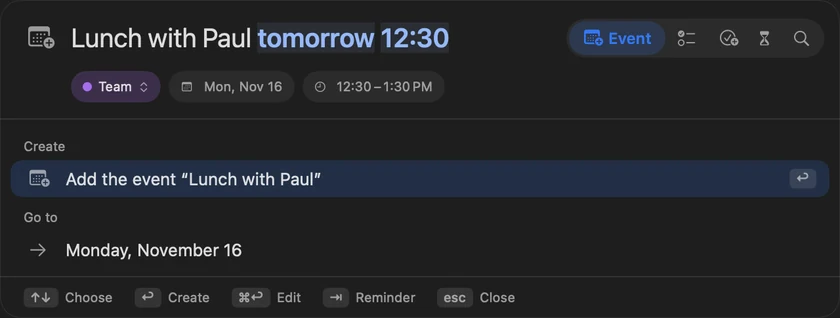
Type one line
What you type is read as you type, and the rows under the field show what InstaCal made of it. Return does the top row; Up Arrow and Down Arrow choose another one first. The rows come in up to four groups:
- Create — the event, reminder, task or countdown the line describes, such as Add the event “Lunch with Paul”.
- Go to — a date in the line, such as
fridayordec 25. Choosing it opens the calendar window on that day. - Commands — InstaCal's own commands whose names start with what you typed: Today, New Event, New Reminder, New Task, Add from Image… on Macs that have it, each calendar view by name, Open Calendar Window, Show Reminders, Open Countdowns and Settings.
settingsopens Settings andwefinds Week. Where a command has a keyboard shortcut, the row shows it. - Find — upcoming events, reminders and recent past events that match. Choosing one shows it in the calendar window.
A line that is only a date goes to that date rather than making an untitled event. A line that names a command runs it. Anything else that reads as something to add puts Create first.
An English edit such as Move gym to Friday or Cancel dentist is offered as a single row that applies the change, the same Quick Edit described in Quick Add, Search and Quick Edit.
Add an event, reminder, task or countdown
The line is read the same way Quick Add reads it, in every language InstaCal speaks. Under the field, InstaCal shows what it would save: the date, the time, the place, a repeat, and + with a count when the line puts it on several dates — gym mon wed fri at 6am makes a separate event on each day. The colored chip shows the calendar or reminder list it lands in; click it to choose another, and the next entry goes there too.
Which kind it makes follows the words. remind me to call Mum friday is a reminder, task: renew passport is a task, and countdown to Lisbon june 1 or days until graduation june 12 is a countdown. Otherwise it follows New items create in Settings → Events.
To choose the kind yourself, click one of the buttons beside the field — Event, Reminder, Task, Countdown and Search — or press Tab to move along them and Shift-Tab to move back. Once you pick one, the line is read as that kind whatever else it could mean; Search adds nothing and only looks for what is already there.
Press Return to add it. The bar says Added with the title and closes. Press Command-Return instead to carry the line into the panel's Quick Add, where you can fill in alerts, people or notes before adding it. A task lands in your Inbox.
With Parse quick entry with Apple Intelligence on in Settings → Events, Apple Intelligence can refine the reading a moment after you stop typing, on Macs that support it. The calendar you picked on the chip does not change when it does.
Change the shortcuts
Option-Command-K is set under Settings → Shortcuts → Global Shortcuts → Command Bar; clear it to leave those keys free for other apps. Command-K is under Settings → Shortcuts → Menu Commands → Command Bar and works only while InstaCal is the active app. See Keyboard Shortcuts.
Note: With App Lock on, InstaCal asks you to unlock before the bar opens.
